Before you go...
We built a free scorecard that shows how your heat pump, ventilation and solar systems are performing. Results are usually surprising.
Get my score
No thanks
We built a free scorecard that shows how your heat pump, ventilation and solar systems are performing. Results are usually surprising.
No thanksWe built a free scorecard that shows how your heat pump, ventilation and solar systems are performing. Results are usually surprising.
No thanks
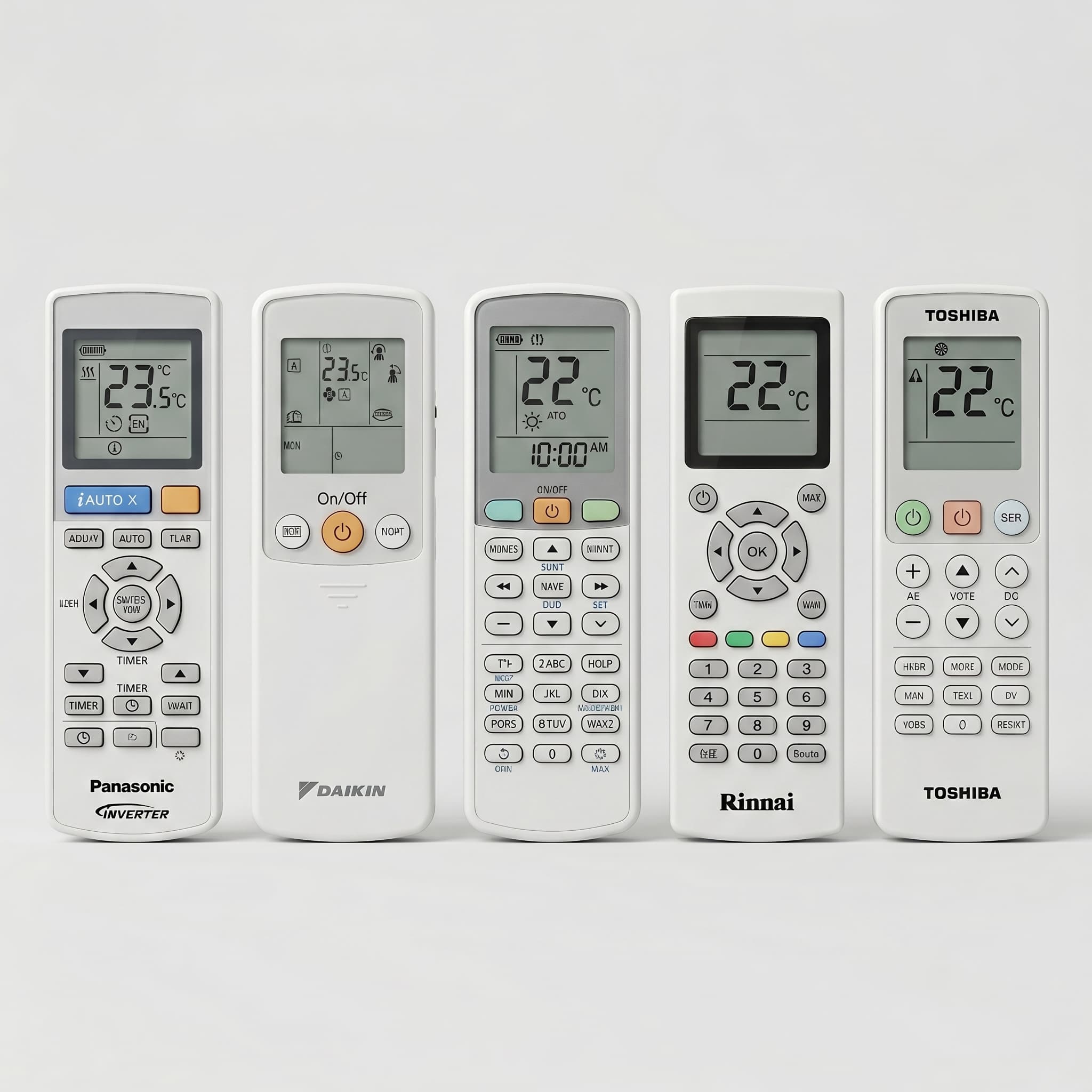
You probably know the sun and the snowflake. The other fifteen are the ones that cause problems; a light starts flashing, a mode changes without you meaning to change it, or the room stops responding the way it used to. This guide covers every symbol on a heat pump or air conditioner remote, what it does, when to use it, and what to do when the display shows something you have not seen before.
Heat pump remotes use symbols rather than words because the same unit is sold across dozens of countries. The symbols work in any language. What they do not do is explain themselves.
The problem is that these symbols were designed by engineers who understood them. When you pick up the remote for the first time, especially in a house where the previous owner left no documentation, you are expected to work out what they mean from context.
There are five mode symbols on most heat pump remotes: heat (sun), cool (snowflake), dry (water droplet), fan only (fan blade), and auto (letter A in circular arrows). Each controls what the system is doing. Every other button adjusts how the selected mode runs.
Heat mode: the sun
The sun symbol is a circle with straight lines radiating outward. Selecting heat mode tells the system to raise the room temperature to the number shown on the display. The sun does not represent the weather outside. On a cold overcast day in Auckland in July, you select the sun. The system heats the room to your set temperature and maintains it there.
One thing worth knowing: when you first switch on heat mode in winter, the indoor unit may not blow air for two to five minutes. The system is warming the internal heat exchanger before it starts circulating air. This prevents cold air from blowing across the room during startup. It is not a fault.
Cool mode: the snowflake
The snowflake symbol is a six-pointed crystal with small branches on each arm. Selecting cool mode tells the system to lower the room temperature to the number on the display. The snowflake does not mean it is cold outside. On a humid Auckland summer afternoon, you select the snowflake. The system cools to your set temperature and holds it.
One warning that applies specifically in Auckland: if the louvers are angled directly downward in cool or dry mode for an extended period, condensation can form on the outlet and drip onto furniture. Angling the louvers toward horizontal in cooling mode avoids this.
Auto mode: the letter A inside circular arrows
Auto mode looks like a capital letter A enclosed in a loop of directional arrows. In theory it does what it says: the system evaluates room temperature against your set point and selects heating or cooling automatically. In practice, auto mode creates problems in NZ conditions that are worth knowing before you rely on it.
On a winter afternoon, if the sun warms the room one or two degrees past the set point, auto mode switches to cooling. The system then blows cold air into a house that was already comfortable. You come home to a cold room and a higher power bill.
Manufacturers note that auto mode is not recommended in homes with multi-split systems; one outdoor unit running multiple indoor units. If one unit tries to heat while another tries to cool, the system cannot service both simultaneously and enters a standby state.
For most NZ conditions, manually selecting heat in winter and cool in summer is more efficient and more predictable than auto.
Dry mode: the water droplet
The water droplet symbol is the most misunderstood icon on any heat pump remote. It is typically shown as a single teardrop shape, or occasionally a small cluster of droplets. Some Gree remotes show an umbrella instead.
Dry mode does not heat the room. It drops the air temperature just enough that moisture in the air condenses on the internal coil and drains out through the drain line. The room temperature drops slightly as a side effect. On a hot, humid day in summer, dry mode removes excess moisture while keeping the room at roughly the same temperature.
In NZ winter conditions, dry mode is the wrong choice for most situations. Running dry mode on a cold damp morning to clear window condensation makes the room colder. Panasonic and Daikin state in their operation manuals that dry mode is not possible when outdoor temperature is 15°C or below. Hitachi states that the dehumidifying function does not work below 15°C indoors. On a cold Auckland morning, these limits are regularly breached.
Dry mode is also not a substitute for a dehumidifier. Mitsubishi Electric's own documentation states this directly. For serious moisture problems in NZ homes, a dedicated desiccant dehumidifier that adds heat back into the room is more effective in winter conditions.
One important thing to know about the dry mode symbol: you cannot freely adjust the temperature or fan speed while the unit is in dry mode. The remote locks these settings automatically. If your remote appears unresponsive to temperature changes while the water droplet is showing, that is normal behaviour, not a remote fault.
Fan only mode: the fan blade
The fan symbol looks like a multi-blade propeller or pinwheel. Fan only mode circulates air through the indoor unit without running the compressor. The room temperature does not change. The outdoor unit does not operate.
Fan only mode is useful for airing out a room or circulating air when no heating or cooling is needed. It is sometimes used to dry the internal components after a cooling cycle. It is not a heating mode.
Because a heat pump recirculates indoor air rather than drawing in outside air, running combustion appliances such as a gas fire or wood burner in a sealed room alongside the heat pump requires adequate ventilation. The system does not replace oxygen consumed by combustion.
Fan speed is almost always controlled by a button labelled FAN or FAN SPEED, sometimes marked with a fan blade icon. The speed levels are shown on the remote display as a series of ascending vertical bars, or as text labels.
The number of speeds varies by brand. Mitsubishi Electric offers five manual levels plus a quiet mode and an auto setting. Haier offers three. Most brands fall somewhere in between.
Auto fan speed (shown as AUTO on the display, or sometimes as A) is the most energy-efficient choice for most situations. In auto, the system runs the fan at a higher speed to reach the set temperature quickly, then drops to a lower speed to maintain it. This is more efficient than locking the fan at a fixed high speed.
Quiet or silent fan settings are available on most brands and reduce indoor noise by dropping the fan to its lowest speed. On some units this is labelled QUIET on the remote. On others it appears as a pine tree icon or a crescent moon icon alongside the fan speed display. The pine tree and moon create confusion because they mean different things on different brands. This is addressed in detail in the cross-brand section below.
The arrows and louver diagrams on your remote control two things: the angle of the horizontal louver (up and down) and the angle of the vertical deflectors (left and right). They cause more confusion than mode symbols, partly because they appear in two forms and partly because the automatic swing function is often hidden behind the same button as the fixed position setting.
Vertical airflow (up and down)
The vertical swing symbol shows a side profile of the indoor unit with a small adjustable flap and arrows pointing up and down. Pressing this button steps the horizontal louver through a series of fixed positions, typically four to six angles from ceiling to floor. Continuing to press the button, or holding it, activates the automatic swing function where the louver moves continuously up and down to distribute air across the room.
For heating, the most effective angle is downward, because warm air rises and needs to be directed toward the floor to heat the lower half of the room. For cooling, the most effective angle is horizontal or slightly upward, because cold air falls and will reach the floor without being directed there directly.
Horizontal airflow (left and right)
The horizontal swing symbol shows the front face of the indoor unit's air outlet with arrows pointing left and right. This controls the vertical deflectors that adjust side-to-side airflow. On premium models across most brands, this swing is motorised and controlled from the remote. On standard models, the vertical deflectors must be adjusted manually by hand.
Critical warning on louver adjustment
Multiple manufacturers include explicit warnings in their operation manuals about manual louver adjustment. Mitsubishi Electric states: always use the remote controller when changing the direction of airflow. Moving the horizontal vanes with your hands causes them to malfunction. Mitsubishi Heavy Industries states: do not try to adjust the flaps and louvers by hand, as the control angle may change or the flap or louver may not close completely.
The reason is mechanical. The louvers are driven by small stepper motors. Forcing the louver to a position by hand can strip the gears, crack the plastic louver arm, and desynchronise the motor's tracking of where the louver actually is. The result is a louver that will not close properly when the unit shuts down, or one that the remote can no longer position correctly. Always use the remote buttons.
The snowflake means the unit is in cooling mode. It will lower the room temperature to the number set on the remote display. The snowflake represents the output the system will produce, not the weather outside. In summer, you select the snowflake to cool the room. On a cold day, selecting the snowflake will attempt to cool a room that may already be below your set temperature, and the compressor will do little or nothing because the room is already at or below the target.
The water droplet symbol activates dry mode. Dry mode removes humidity by dropping the air temperature just enough that moisture in the air condenses on the internal coil and drains out through the drain line. It produces a mild cooling side effect but is not designed to heat the room or to significantly change the temperature. In NZ winter conditions, when outdoor temperatures regularly fall below 15°C overnight, dry mode is frequently ineffective or completely inactive due to manufacturer-specified operating limits. For a full explanation of what dry mode does and when to use it in NZ, see the heat pump dry mode NZ guide.
Timer symbols
The timer function is shown as a circular clock face, or simply the text ON and OFF on the remote display. Nearly every brand offers an ON timer (the unit turns on at a set time) and an OFF timer (the unit turns off at a set time). Some brands also offer a weekly scheduler that lets you programme different times for each day of the week.
One thing the manuals consistently warn about, and owners consistently miss: the remote must be able to transmit to the indoor unit at the time the timer activates. If the remote is in a drawer, behind curtains, or in another room, the signal will not reach the unit. Toshiba, Fujitsu, and Mitsubishi Electric all note in their manuals that a signal transmission failure causes a time lag of up to 15 minutes or means the unit simply does not activate.
A power cut clears timer memory on most brands. If your unit stops following its timer after a power outage, the clock and timer settings need to be reprogrammed from scratch.
Weekly timers and ON/OFF timers cannot be used simultaneously on Daikin, Fujitsu, and Toshiba systems. Setting a basic ON/OFF timer overrides the weekly schedule.
Sleep mode: the crescent moon
The crescent moon symbol activates sleep mode on most brands. Sleep mode gradually adjusts the set temperature over several hours to prevent the room from becoming too warm in winter or too cold in summer. The result is a room that stays comfortable through the night without running the compressor harder than necessary.
One important correction applies to Mitsubishi Electric specifically. ME's function associated with the crescent moon is called NIGHT MODE, and it operates differently from other brands' sleep modes (per ME documentation). ME's NIGHT MODE dims the indicator lights on the indoor unit and reduces outdoor unit noise. It does not gradually adjust temperature overnight the way Panasonic, Fujitsu, and Toshiba sleep modes do. If you have a Mitsubishi Electric unit and want overnight temperature management, check your model's manual for the specific sleep function available.
Daikin's documentation describes this function as NIGHT SET, operating through the OFF timer with a clock icon rather than a dedicated moon symbol. If your Daikin remote does not have a moon symbol, this is why. For the full Daikin remote guide, see the Daikin heat pump remote guide.
Economy mode: the leaf
Economy or ECO mode appears as a plant leaf icon on most brands, or as the text ECO, ECONAVI, or ECONO COOL depending on the brand. Economy mode reduces the maximum power the compressor can draw, which lowers running costs during moderate conditions.
The important qualification: economy mode caps compressor output. On extremely cold or hot days, the system may not reach the set temperature while economy mode is active. If the room feels like it is not responding properly on a very cold winter day or a hot summer afternoon, check whether economy mode is engaged. Switching to normal mode allows the compressor to run at full capacity.
Powerful or turbo mode: the flexing bicep or TURBO text
Powerful or turbo mode runs the system at maximum compressor speed and fan volume to change the room temperature as quickly as possible. On Daikin and some Toshiba remotes this mode is shown as a flexing bicep arm. On most other brands it appears as text: TURBO, POWERFUL, Hi POWER, or Hi-POWER. LG uses the letters Po, representing Jet Mode.
This mode stops automatically after 15 to 20 minutes on most brands. If the room is already at or near the compressor's maximum capacity when turbo mode is activated, pressing the button produces no additional output. The inverter is already running at its limit.
Flashing lights on your heat pump's indoor unit fall into two categories: normal operating states and fault states. The correct response to each is different, which is why the distinction matters.
Normal flashing states
Slow blinking of the operation light during heating mode means the system is either pre-heating the internal heat exchanger before blowing air, or the outdoor unit is running a defrost cycle. The outdoor coil accumulates frost in cold, damp conditions. The system temporarily reverses its cycle to melt the ice before resuming normal operation. This takes between 10 and 15 minutes under typical conditions. In NZ's damp winter climate, particularly in Auckland and Northland, defrost cycles can run for up to 30 minutes on cold overnight settings. Waiting is the correct response. Turning the unit off and on repeatedly resets the cycle and extends the time before warm air returns.
Filter reminder lights, where present, blink to indicate the air filter needs cleaning. Rinnai and Carrier display CL on the indoor unit screen. Fujitsu blinks the ECONOMY lamp. Hitachi's green CLEAN lamp blinks at 1 second on and 4 seconds off. as a filter reminder (a different pattern from the fault state). After cleaning the filter, the reminder must be reset from the remote or indoor unit. It does not reset automatically.
DRM (Demand Response Mode) activation, when your electricity retailer temporarily reduces your unit's output during peak grid events, also produces a blinking operation light on most brands. This is a normal power management function.
Fault states
Fast, rapid blinking of the operation light or all lights on the indoor unit indicates a fault. The specific definition of fast varies by brand. Mitsubishi Heavy Industries specifies a fault as 0.5 seconds on and 0.5 seconds off simultaneously across the RUN and TIMER lights. Toshiba specifies five flashes per second. Gree shows an alphanumeric error code on the display when a fault occurs, replacing the temperature reading.
For Mitsubishi Heavy Industries units specifically, the number of times the RUN or TIMER light flashes before repeating identifies the fault type. One to three flashes from the RUN light indicates an indoor temperature or heat exchanger sensor issue. Six flashes indicates an indoor fan motor failure. Seven flashes indicates a refrigerant issue. The manual instructs owners to count the flashes and report the pattern to the dealer rather than attempting to diagnose it themselves. Turning off the breaker before counting erases the fault pattern.
When a fault state is present: turn off the breaker, wait three minutes, and switch it back on. If the fault blinking resumes, contact a technician. Do not continue operating the system in a fault state.
The three-minute protection delay
Across all brands, switching the unit off and back on immediately triggers a compressor protection delay of two to three minutes before the system resumes operation. This is a built-in protection against compressor overload. The unit is not broken. The remote is working. The delay is expected.
These five symbols generate more calls, more forum posts, and more incorrect assumptions than any others on a heat pump remote.
1. The louver swing arrows
The airflow direction arrows do not just set a fixed louver position. They also activate a continuous automatic swing when pressed repeatedly or held. Owners who accidentally activate swing mode and then try to stop it by pressing the button once often end up toggling through positions rather than stopping the motion. To stop the swing, press the button until the display shows a fixed position rather than a sweeping animation.
Never move the louvers by hand. The manufacturer warnings on this point are consistent across every brand in the NZ market.
2. Defrost and pre-heating during heat mode
The operation light blinks and warm air stops. Most owners assume a fault. In winter, this is almost always the defrost cycle. The outdoor unit is melting ice off the coil. In Auckland's damp climate this is more frequent and longer-running than manufacturer estimates for drier climates suggest. Wait 15 to 30 minutes before assuming a fault.
3. Dry mode temperature and fan lockout
When the water droplet symbol is active, the remote will not respond to temperature or fan speed changes. This is designed behaviour, not a remote malfunction. The system controls these settings automatically in dry mode.
4. Cool mode condensation drip from downward airflow
Angling the louvers straight down in cool or dry mode for an extended period causes condensation to form on the plastic outlet and drip onto furniture. Mitsubishi Heavy Industries warns explicitly: do not operate for a long period with the airflow blowing straight down in cool or dry mode. Keep the louvers at a horizontal angle in cooling mode.
5. Auto mode in homes with multiple indoor units
If your home has a multi-split system (multiple wall units running from a single outdoor unit), auto mode on any individual unit can create a mode conflict. One unit trying to cool and another trying to heat cannot be serviced by a single outdoor compressor simultaneously. The result is a standby state that looks like a fault. Mitsubishi Electric, Mitsubishi Heavy Industries, Fujitsu, Toshiba, and Panasonic all note this in their manuals. In a multi-split home, manually select heat or cool on every unit rather than using auto.
The table below covers all 13 brands common in the NZ market. Each cell shows the name the brand uses for that function and a plain-text description of what the symbol looks like on the remote display.
Note on Mitsubishi Electric vs Mitsubishi Heavy Industries: These are two separate companies with different remotes, different apps, and different feature sets. In NZ, Mitsubishi Heavy Industries units are sold under the Bronte, Avanti Plus, and Ciara sub-brand names. If your unit says Bronte or Ciara on the front panel, it is a Mitsubishi Heavy Industries product and uses a different remote from Mitsubishi Electric.
| Brand | Name | Symbol |
|---|---|---|
| Mitsubishi Electric | HEAT | A sun icon |
| Mitsubishi Heavy Industries | HEAT | A sun icon |
| Daikin | HEAT | A sun icon |
| Fujitsu | HEAT | A sun icon |
| Panasonic | HEAT | A sun icon |
| Hitachi | Heat | A sun icon |
| Toshiba | Heating | A sun icon |
| Gree | Heat | A sun icon |
| Samsung | Heat | A sun icon |
| LG | Heating | A sun icon |
| Haier | HEAT | A sun icon |
| Carrier | Heat | A sun icon |
| Rinnai | HEAT | A sun icon |
Heat mode is the one function where all 13 brands use the same symbol.
| Brand | Name | Symbol |
|---|---|---|
| Mitsubishi Electric | COOL | A snowflake icon |
| Mitsubishi Heavy Industries | COOL | A snowflake icon |
| Daikin | COOL | A snowflake icon |
| Fujitsu | COOL | A snowflake icon |
| Panasonic | COOL | A snowflake icon |
| Hitachi | Cool | A snowflake icon |
| Toshiba | Cooling | A snowflake icon |
| Gree | Cool | A snowflake icon |
| Samsung | Cool | A snowflake icon |
| LG | Cooling | A snowflake icon |
| Haier | COOL | A snowflake icon |
| Carrier | Cool | A snowflake icon |
| Rinnai | COOLING | A snowflake icon |
Cool mode is the second function where all brands use the same symbol.
| Brand | Name | Symbol |
|---|---|---|
| Mitsubishi Electric | AUTO | A circle made of arrows |
| Mitsubishi Heavy Industries | AUTO | The letter A with looping arrows |
| Daikin | AUTO | The letter A inside looping arrows |
| Fujitsu | AUTO | The letter A with arrows |
| Panasonic | AUTO | The letter A inside a circle of arrows |
| Hitachi | Auto | The letter A |
| Toshiba | Auto | The letter A |
| Gree | Auto | A triangle made of three arrows |
| Samsung | Auto | Text reading Auto |
| LG | Auto changeover | The letter A |
| Haier | AUTO | Looping arrows |
| Carrier | Auto | The letter A |
| Rinnai | AUTO | The letter A surrounded by arrows |
Gree is the notable outlier here: a triangle of three arrows rather than the letter A. Samsung is the only brand that uses plain text for this function.
| Brand | Name | Symbol |
|---|---|---|
| Mitsubishi Electric | DRY | A water drop icon |
| Mitsubishi Heavy Industries | DRY | A water drop icon |
| Daikin | DRY | A water drop icon |
| Fujitsu | DRY | A water drop icon |
| Panasonic | DRY | A water drop icon |
| Hitachi | Dry | A water drop icon |
| Toshiba | Dry | A water drop icon |
| Gree | Dry | A water drop icon or umbrella icon |
| Samsung | Dry | A water drop icon |
| LG | Dehumidification | A water drop icon |
| Haier | DRY | A water drop icon |
| Carrier | Dry | A water drop icon |
| Rinnai | DRY | A water drop icon |
Gree is the only brand that uses an umbrella as an alternative to the water droplet for this function. If you have a Gree remote showing an umbrella icon, it is dry mode.
| Brand | Name | Symbol |
|---|---|---|
| Mitsubishi Electric | FAN | A fan propeller icon |
| Mitsubishi Heavy Industries | FAN | A fan blade icon |
| Daikin | FAN ONLY | A fan blade icon |
| Fujitsu | FAN | A fan blade icon |
| Panasonic | FAN | A fan propeller icon |
| Hitachi | Fan | A fan blade icon |
| Toshiba | Fan only | A fan blade icon |
| Gree | Fan | A fan blade icon |
| Samsung | Fan | A fan blade icon |
| LG | Air Circulation | A fan blade icon |
| Haier | FAN | A fan blade icon |
| Carrier | Fan | A fan blade icon |
| Rinnai | FAN | A fan blade icon |
| Brand | Name | Symbol |
|---|---|---|
| Mitsubishi Electric | ECONO COOL | Text reading ECONO COOL |
| Mitsubishi Heavy Industries | ECONOMY | Text reading eco |
| Daikin | ECONO | Text reading ECONO |
| Fujitsu | ECONOMY | Text reading ECO or ECONOMY |
| Panasonic | ECONAVI | Text reading ECONAVI |
| Hitachi | Smart Eco | A leaf icon |
| Toshiba | ECO | Text reading ECO |
| Gree | Energy-saving | Text reading SE |
| Samsung | Eco | Text reading Eco |
| LG | Energy Ctrl. | A plug or leaf icon |
| Haier | ECO | Text reading ECO |
| Carrier | ECO | Text reading ECO |
| Rinnai | ECO | Text reading ECO |
Economy mode is one of the least standardised functions across brands. The symbol, the name, and the exact way the mode limits output all vary significantly. What is consistent: all economy modes cap maximum compressor power, and all of them may reduce heating or cooling capacity on extreme weather days.
| Brand | Name | Symbol |
|---|---|---|
| Mitsubishi Electric | NIGHT MODE | A crescent moon icon — dims indicator lights and reduces outdoor unit noise only. Does not adjust temperature during sleep (per ME documentation). |
| Mitsubishi Heavy Industries | SLEEP | Text reading SLEEP |
| Daikin | NIGHT SET mode | Uses the OFF timer clock icon, not a moon symbol |
| Fujitsu | SLEEP | Text reading SLEEP |
| Panasonic | SLEEP | Text reading SLEEP |
| Hitachi | SleepSense | A bed with a moon icon |
| Toshiba | COMFORT SLEEP | A crescent moon and star icon |
| Gree | Sleep | A crescent moon icon |
| Samsung | good'sleep | A moon and stars icon |
| LG | Sleep mode auto | A star and moon icon |
| Haier | SLEEP | A moon and Zzz icon |
| Carrier | Sleep | A crescent moon icon |
| Rinnai | SLEEP | A crescent moon icon |
Two important corrections apply here. Mitsubishi Electric's NIGHT MODE (crescent moon) dims indicator lights and reduces outdoor noise. It does not gradually adjust temperature overnight the way Panasonic, Fujitsu, and Toshiba sleep modes do. Daikin's documentation describes this function as NIGHT SET, operating through the OFF timer with a clock icon rather than a dedicated moon symbol. If your Daikin remote does not have a moon symbol, this is why.
| Brand | Name | Symbol |
|---|---|---|
| Mitsubishi Electric | POWERFUL | Text reading POWERFUL |
| Mitsubishi Heavy Industries | HIGH POWER | Text reading HIGH POWER |
| Daikin | POWERFUL | A flexing bicep icon |
| Fujitsu | POWERFUL | Text reading POWERFUL |
| Panasonic | POWERFUL | Text reading POWERFUL |
| Hitachi | Powerful | Fast fan icon or text reading Powerful |
| Toshiba | Hi-POWER | A flexing bicep icon or text reading Hi POWER |
| Gree | Turbo | A fan blade icon or text reading TURBO |
| Samsung | Fast | A running fan icon or text reading Fast |
| LG | Jet Mode | A jet plane icon or the letters Po |
| Haier | TURBO | Text reading TURBO |
| Carrier | Turbo | Text reading Turbo |
| Rinnai | TURBO | Text reading TURBO |
The flexing bicep icon appears on Daikin and some Toshiba remotes. Most brands use text for this function. LG's Jet Mode symbol, a small jet plane taking off, is one of the more counterintuitive symbols on any heat pump remote.
| Brand | Name | Symbol |
|---|---|---|
| Mitsubishi Electric | Quiet | Text reading Quiet |
| Mitsubishi Heavy Industries | SILENT | Text reading SILENT |
| Daikin | QUIET | A pine tree or moon icon |
| Fujitsu | LOW NOISE | Text reading LOW NOISE or QUIET |
| Panasonic | QUIET | Text reading QUIET |
| Hitachi | Silent | Text reading Silent |
| Toshiba | QUIET | Text reading QUIET |
| Gree | Quiet | A headphones icon |
| Samsung | Quiet | Text reading Quiet |
| LG | SILENT | Text reading SILENT |
| Haier | QUIET | Text reading QUIET |
| Carrier | Silence | Text reading Silence |
| Rinnai | QUIET | Text reading QUIET |
Critical symbol collision: The pine tree icon on Daikin remotes means Outdoor Unit Quiet mode. On Gree, Toshiba, Haier, and Rinnai, the pine tree icon means Health or Air Purification (ioniser or plasma function). The same symbol performs completely different functions depending on the brand. If you see a pine tree on your remote and are not sure which brand you have, check your brand in the table above before pressing it.
| Brand | Name | Symbol |
|---|---|---|
| Mitsubishi Electric | VANE | Sweeping lines or a flap with arrows |
| Mitsubishi Heavy Industries | AIR FLOW (UP/DOWN) | Text reading U/D and sweeping lines |
| Daikin | SWING | A flap with sweeping arrows |
| Fujitsu | SET or SWING | A flap with arrows |
| Panasonic | AIR SWING | A flap with arrows |
| Hitachi | Up/Down | Sweeping lines |
| Toshiba | SWING | A flap with sweeping arrows |
| Gree | Up and down swing | Sweeping lines |
| Samsung | Vertical air swing | A flap with arrows |
| LG | SWING | A flap with sweeping arrows |
| Haier | SWING Up/Down | Sweeping lines |
| Carrier | SWING | Sweeping lines |
| Rinnai | SWING | Sweeping lines |
| Brand | Name | Symbol |
|---|---|---|
| Mitsubishi Electric | FAN | A fan blade with ascending bars |
| Mitsubishi Heavy Industries | FAN SPEED | Ascending bars |
| Daikin | FAN | Stair-step bars or a fan blade |
| Fujitsu | FAN | Text indicating speed levels |
| Panasonic | FAN SPEED | Ascending bars or arrows |
| Hitachi | Fan Speed | Ascending bars |
| Toshiba | FAN | Ascending bars |
| Gree | FAN | A fan blade with bars |
| Samsung | Fan | Ascending bars |
| LG | FAN SPEED | Ascending bars |
| Haier | FAN SPEED | Ascending bars |
| Carrier | FAN SPEED | Ascending bars |
| Rinnai | FAN SPEED | Ascending bars |
Carrier is the notable exception on some models, where fan speed may be displayed differently from the ascending bar format used by other brands.
A small number of symbols appear on specific brands that have no equivalent elsewhere and cause genuine confusion when owners encounter them for the first time.
Gree: the dollar sign
On Gree remotes, a dollar sign activates the 8°C heating frost protection function. This keeps the room at a minimum of 8°C to prevent pipes and stored items from freezing during winter absence. It is not a payment or cost function. It is activated through the TEMP and CLOCK combination buttons rather than a dedicated button.
Samsung: WindFree Cooling
On Samsung units with WindFree capability, cool air is dispersed through thousands of micro-holes across the front panel rather than through motorised louvers. If you have a Samsung unit and the louvers are not moving in cooling mode, this may be normal operation rather than a fault.
LG: Mosquito Away
Some LG units include a Mosquito Away function that emits an ultrasonic frequency. If you press this button expecting a standard heating or cooling mode and nothing obvious happens, the unit is functioning normally. On budget LG models, buttons for features not available on that specific unit produce no response at all. A non-response is not a remote fault.
Rinnai: humidity control in dry mode
Rinnai is the only brand in the NZ market with a HUMIDITY button on the handheld remote that lets you set a target humidity level between 35% and 85% in 5% increments during dry mode. No other brand offers this level of dehumidification control on a standard handheld remote.
Carrier and Rinnai: dF and CL on the display
Both Carrier and Rinnai display dF on the indoor unit screen during a defrost cycle and CL as a filter cleaning reminder. These are normal operational messages. They are not error codes.
The I Feel, Follow Me, and i-See sensor functions
Several brands offer a sensor-based temperature or presence detection function, but they work differently. Gree's I Feel function uses a temperature sensor in the remote control itself, transmitting the remote's ambient temperature to the indoor unit every 10 minutes so the system targets the temperature where you are sitting rather than where the indoor unit is mounted. Daikin's Intelligent Eye and Mitsubishi Electric's i-See sensor work differently: they use an infrared thermal sensor on the indoor unit to detect human presence and direct or divert airflow accordingly. These are three different technologies marketed under similar names.
If you have been gradually raising the set temperature over months or years to get the same result the unit used to deliver at a lower setting, that is a maintenance signal, not normal ageing. A unit that once held 20°C reliably on a setting of 20°C now needs a setting of 24°C to reach the same result. If you have accepted that as normal ageing, it is not. It is progressive efficiency loss from a system that has not been professionally maintained.
Every manufacturer in the NZ market states in their operation manuals that filter cleaning alone does not maintain the system. Professional heat pump servicing covers the internal fan housing, the internal coil, the moisture drain line, and the electrical components. These cannot be reached by an owner with a damp cloth and a vacuum.
Mitsubishi Electric states in their documentation that dirty filters contribute to the growth of fungi such as mould on internal components. Daikin states that operation with dirty filters results in poor heating or cooling performance and may cause odour. Toshiba states that failure to clean the indoor and outdoor units regularly will result in poor performance, freezing, water leakage, and compressor failure.
These are not marketing claims from a service company. They are manufacturer-stated maintenance requirements. Rinnai's warranty documentation confirms that failure to maintain the unit annually during the product warranty period may void the warranty. Carrier's warranty conditions state that the owner is responsible for correct operation and regular maintenance including regular filter cleaning and replacement.
Recommended professional service intervals across the brands most common in NZ: Hitachi recommends every six to twelve months. Toshiba recommends annually, or every three months for units running eight or more hours per day. Samsung and LG require annual professional inspection. Daikin recommends at least once a year.
If you know what the filter reminder light means and clean the filter when it appears, your system's internal components will be in better condition than if you had ignored it. Remote understanding is connected to system health directly.
If the remote stops responding, the most likely cause is battery failure. Replace the batteries first before assuming a fault. Mitsubishi Electric, Fujitsu, and Hitachi all require a recessed reset button to be pressed after battery replacement. This button is typically a small hole in the back or side of the remote that requires a pen tip or pin to activate. Without pressing it, the remote will not function correctly after a battery change on these brands.
If the remote is lost entirely, options vary by brand. Most brands offer replacement remotes through their NZ distributors. Universal remotes are available for some brands. For units with wifi connectivity, the corresponding app can control the unit from a smartphone while a replacement remote is sourced.
A unit that does not respond to any remote command may be in a fault state unrelated to the remote. Check the indicator lights on the indoor unit. If the TIMER light or equivalent is blinking continuously and the unit is not operating normally, follow the fault state process above: turn off the breaker, wait three minutes, and switch back on. If the fault persists, contact a technician.
The raindrop or water droplet symbol means the unit is in dry mode. Dry mode removes humidity by dropping the air temperature just enough that moisture condenses on the internal coil and drains out through the drain line. It produces a mild cooling side effect. In NZ winter conditions, where outdoor temperatures regularly fall below 15°C overnight, dry mode is often ineffective because most brands restrict the function below this temperature threshold. Running dry mode on a cold damp morning typically makes the room colder rather than drier.
The sun symbol means the unit is in heating mode. It will raise the room temperature to the number set on the remote display. The sun represents the output the system produces, not the weather conditions outside. When heating mode starts in cold weather, the indoor unit may not blow air for two to five minutes while the heat exchanger warms up. This is normal.
The snowflake symbol means the unit is in cooling mode. It will lower the room temperature to the set point on the display. In NZ winter conditions, selecting the snowflake mode will attempt to cool a room that may already be at or below your set temperature, and the compressor will do little or nothing as a result.
The fan symbol activates fan only mode. The indoor fan circulates air through the unit without running the compressor. The room temperature does not change and the outdoor unit does not operate. Fan only mode does not heat or cool the room.
The wifi symbol on a heat pump remote, shown as a central dot with expanding arcs radiating upward, indicates the unit's wireless connectivity status. The exact meaning of different blink patterns varies by brand. On Daikin units with the DAIKIN EYE, a blinking red light means the wifi adapter is ready to pair. A blue light means it is connected. A white light means wifi is disabled. Every brand that supports wifi connectivity in NZ requires a 2.4GHz network for initial setup. No brand in the current NZ market supports 5GHz for this function.
The arrows on a heat pump remote control the direction of airflow from the indoor unit. Up and down arrows control the horizontal louver that directs air toward the ceiling or floor. Left and right arrows, where present on the remote, control the vertical deflectors that adjust side-to-side airflow. Never move the louvers by hand. Always use the remote buttons. Moving the louvers manually can strip the drive gears and prevent the louvers from closing properly when the unit shuts down.
Auto mode evaluates the room temperature against your set point and selects heating or cooling automatically. Avoid it in winter in NZ, especially in homes that receive afternoon sun. When the room temperature rises naturally past the set point, auto mode switches to cooling and blows cold air into a house that was already at a comfortable temperature. Locking the mode to heat in winter and cool in summer is more efficient and more predictable. Avoid auto mode entirely in homes with multi-split systems (one outdoor unit running multiple indoor units), as mode conflicts between units can put the system into standby.
No. A heat pump recirculates the air already inside the room. The outdoor unit transfers heat to or from the refrigerant circuit, but no outside air enters the room through the system. This matters if you run combustion appliances such as a gas fire or wood burner in the same space as a heat pump operating in a sealed room. Combustion consumes oxygen from the indoor air. Because the heat pump is not replacing that oxygen with fresh air from outside, oxygen levels can deplete in a sealed room over time. If you run combustion appliances, ventilate the room adequately regardless of whether the heat pump is operating.
The fan behaviour depends on the mode and the unit's current state. In heating and cooling modes, the fan runs whenever the compressor is active and typically continues briefly after the compressor stops to distribute residual warm or cool air. Some brands run the indoor fan continuously at a very low speed to monitor room temperature. In standby, most units do not run the fan at all. If the fan appears to run constantly at full speed when no mode is selected, check the remote is not displaying fan only mode.
The most common cause is battery failure. Replace the batteries first. On Mitsubishi Electric, Fujitsu, and Hitachi units, press the recessed reset button after fitting new batteries. The second most common cause is sync failure: the remote display shows the current settings but the unit is operating on a different command because the last successful transmission (confirmed by a beep from the indoor unit) was some time ago. Point the remote directly at the indoor unit's receiver panel and press the power or mode button. Confirm the beep before assuming the command was received. If the unit shows a fault state (continuous blinking of the TIMER or equivalent lamp), follow the fault state process before troubleshooting the remote.
Flashing lights on the indoor unit have several possible meanings, most of which are normal. A slowly blinking operation light during heating mode means a defrost or pre-heat cycle is in progress. A filter lamp blinking means the air filter needs cleaning. A rapid blink of the operation light or all lamps simultaneously indicates a fault. The specific pattern and speed of the blinking identifies the type of state. On Mitsubishi Heavy Industries units, counting the number of flashes before the pattern repeats identifies the specific fault code. On most brands, turning the breaker off and on resolves temporary faults. If blinking resumes immediately, contact a technician.
The filter light or filter indicator means the air filter is due for cleaning. On most brands this is a time-based reminder triggered after a set number of operating hours, not a sensor that detects actual filter condition. Cleaning the filter clears the build-up, but the indicator must be manually reset from the remote or the unit's reset button before it will turn off. On Rinnai units, the display shows CL after 240 operating hours and nF after 2,880 hours. On Fujitsu units, the ECONOMY lamp blinks as a filter reminder. After cleaning and drying the filter completely, press and hold the filter reset button as specified in your brand's manual to clear the indicator.