Before you go...
We built a free scorecard that shows how your heat pump, ventilation and solar systems are performing. Results are usually surprising.
Get my score
No thanks
We built a free scorecard that shows how your heat pump, ventilation and solar systems are performing. Results are usually surprising.
No thanksWe built a free scorecard that shows how your heat pump, ventilation and solar systems are performing. Results are usually surprising.
No thanks
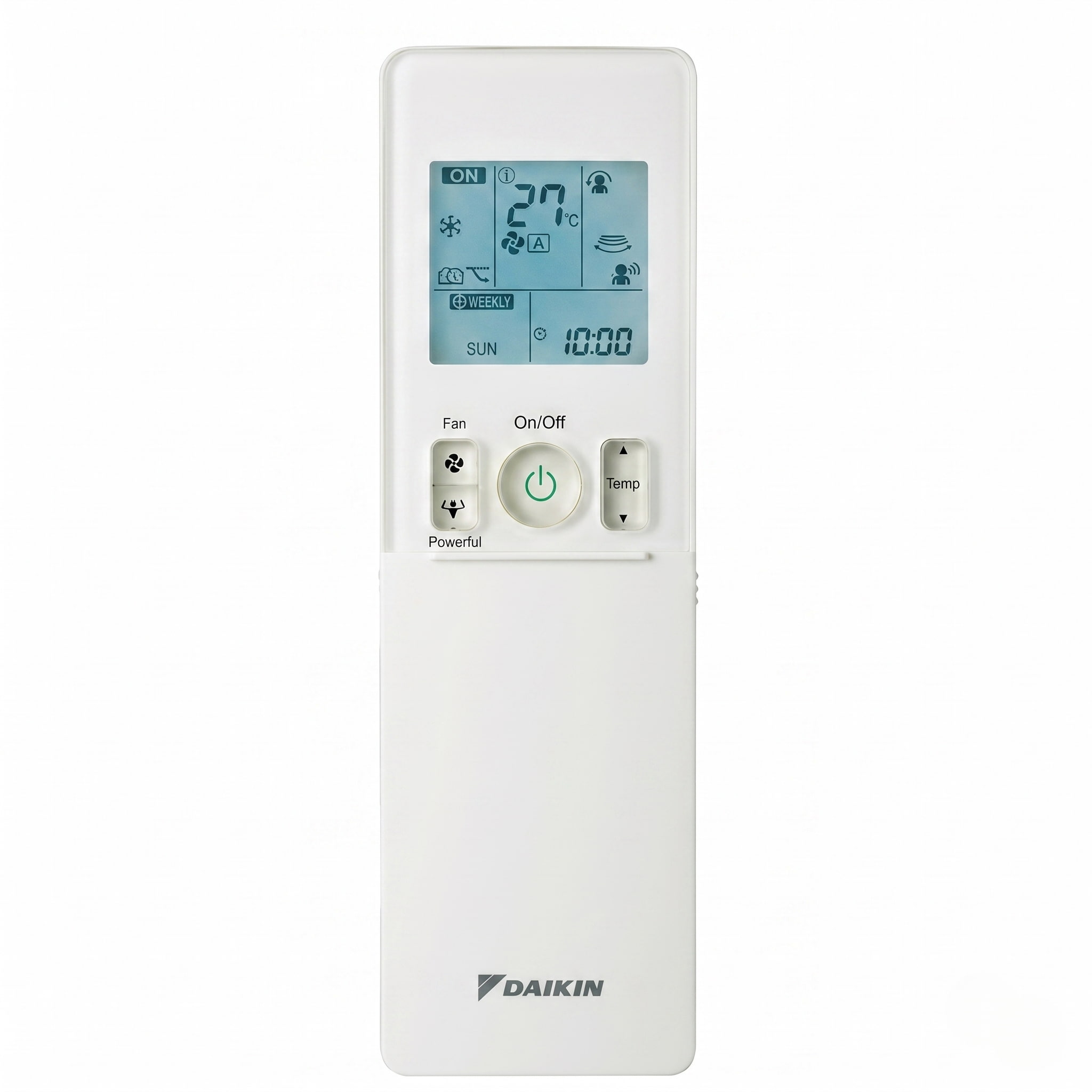
If your Daikin heat pump remote has a button or symbol you do not recognise, this guide covers it. Every mode, every Daikin-specific function, and what to do when something unexpected appears on the display.
Most wall-mounted Daikin units sold in NZ use a remote with a primary LCD display at the top, a row of clearly labelled mode buttons, and a sliding plastic cover over the lower section. Sliding the cover down reveals the timer and scheduling controls.
The main section includes the mode buttons: AUTO, COOL, DRY, HEAT, and FAN ONLY. It also has OFF, temperature up and down, FAN speed, SWING, POWERFUL, ECONO/QUIET, COMFORT, SENSOR, and ON/OFF TIMER. The temperature adjusts in 0.5°C increments with each press of the up or down button.
Behind the sliding cover you find the WEEKLY TIMER controls: WEEKLY, PROGRAMME, COPY, BACK, NEXT, and SELECT. On models with a weekly scheduler, you can programme up to four daily events across the full week.
Two things are worth knowing about the cover. First, many Daikin owners have never opened it. If you have not, slide it down now. Second, the CANCEL button is not behind the cover. It sits in the main panel and has a function that causes confusion when triggered accidentally, covered in the fault code section below.
This guide covers the Daikin wall-mounted residential range sold in NZ over the last decade, including the FTXM, FTXV (Cora), Alira, and Zena Vogue series. Owners of these models will find the remote layout and functions described here match their unit closely. The Lite series (FTXF) uses a simpler remote that does not include the COMFORT, SENSOR, or WEEKLY TIMER buttons covered in the Daikin-specific buttons section below. If you have a Lite series unit, the mode symbols and basic operation sections still apply. The floor console Aura (FVXM) uses a different remote entirely and is not covered here.
HEAT mode: the sun
The sun symbol is a circle with straight radiating lines. Selecting HEAT tells the system to raise the room temperature to the number on the display and hold it there. In winter, select HEAT mode.
When you first switch to heating mode in cold weather, the indoor unit may not blow air for two to five minutes. The system is warming the internal heat exchanger before it begins circulating air, which prevents cold air from crossing the room during startup. This is normal and not a fault.
COOL mode: the snowflake
The snowflake symbol is a six-pointed crystal. Cool mode lowers the room temperature to your set point. Keep the airflow at a horizontal angle during cooling rather than angling the louvers directly downward for extended periods.
DRY mode: the water droplet
The water droplet symbol activates dry mode. This is Daikin's dehumidifier function, sometimes listed as dry mode or dehumidifying mode depending on the manual. Dry mode is the most frequently misused mode on Daikin remotes in NZ conditions.
Dry mode removes humidity by running the compressor in cycles and locking the fan to a low automatic speed. The room temperature drops slightly as a side effect. It is not a heating mode. Running dry mode to clear window condensation in winter makes the room colder, not drier. If you are trying to reduce moisture in winter, heating the room is more effective than dry mode.
You cannot manually adjust the temperature or fan speed while the water droplet symbol is showing. The system automatically takes full control of temperature and airflow in dry mode. This is designed behaviour, not a remote malfunction.
For a full explanation of what dry mode does and when it makes sense to use it in NZ conditions, see the heat pump dry mode NZ guide.
AUTO mode: the letter A inside circular arrows
Auto mode evaluates room temperature against your set point and switches between heating and cooling automatically. Daikin specifies that the unit periodically reselects the mode to maintain temperature.
The problem with auto mode in NZ winters is the same across all brands. Afternoon sun pushing the room one or two degrees past the set point triggers the system to start cooling, sending cold air into a room that was already at a comfortable temperature. For most NZ winter use, manually selecting HEAT and leaving it there gives more reliable results.
FAN ONLY mode: the fan blade
Fan only circulates air through the indoor unit without running the compressor. The outdoor unit does not operate and the room temperature does not change. Fan only mode has a practical use on Daikin units specifically: if you have been running dry mode, switching to fan only for a short period before switching to heating lets the internal components dry rather than immediately evaporating any moisture that has collected.
ECONO mode
ECONO is the mode on Daikin remotes that causes the most confusion when things do not go as expected. The ECONO button limits the maximum electrical current the outdoor unit can draw. This is designed to prevent the circuit breaker from tripping when the heat pump runs alongside other high-draw appliances on the same circuit.
What ECONO does not do is gradually adjust temperature the way other brands' economy modes do. It acts as a hard ceiling on compressor output. On a mild day this works well and reduces running costs. In very cold conditions, limiting compressor output can mean the system struggles to reach your set temperature.
If your Daikin is running but the room is not getting to temperature and ECONO is showing on the display, turn ECONO off before assuming anything else is wrong. Daikin's manual notes that POWERFUL mode cannot be used simultaneously with ECONO. If ECONO is active and you press POWERFUL, the last button pressed takes priority.
POWERFUL mode: the flexing bicep
The flexing bicep symbol activates Powerful mode, which runs the system at maximum compressor speed and fan volume for 20 minutes. After 20 minutes the unit returns automatically to its previous settings. The fan speed drops noticeably at that point. If you do not know about the 20-minute auto-cancel, the drop in fan speed can look like the unit has cut out or developed a fault. It has not. The cycle completed as designed.
Daikin's manual states that POWERFUL cannot run simultaneously with ECONO, OUTDOOR UNIT QUIET, or COMFORT AIRFLOW. The last button pressed takes priority.
COMFORT AIRFLOW: the COMFORT button
Comfort Airflow prevents air from blowing directly at the people in the room. When active, the system forces the louver direction: strictly upward in cool and dry mode, so cold air drifts down gradually, and strictly downward in heat mode, so warm air reaches floor level. The air feels less like a direct draught. The trade-off is that it takes longer to notice the temperature change because the air is not coming directly at you.
COMFORT AIRFLOW cannot run simultaneously with POWERFUL.
OUTDOOR UNIT QUIET mode
If you have read about heat pump symbols from a general guide, this is the one correction to carry away from this article.
On Gree, Toshiba, Haier, and Rinnai remotes, the pine tree symbol activates Health or Air Purification. On Daikin remotes, the Outdoor Unit Quiet icon, which may appear as a pine tree or similar shape depending on your remote variant, activates a different function entirely. It reduces the operating noise from the outdoor unit, which is useful at night if the unit is close to a bedroom window. It is not an air purification function on Daikin.
SENSOR button: Intelligent Eye
Pressing SENSOR activates the Intelligent Eye, an infrared human presence sensor built into the indoor unit. If the sensor detects no movement in the room for more than 20 minutes, it automatically adjusts the temperature to reduce energy use: in heating mode it lowers the set temperature by 2°C, and in cooling mode it raises the set temperature by 2°C if the room is at or below 30°C, or by 1°C if above 30°C. When movement is detected again, it returns to the original set temperature.
The Intelligent Eye also adjusts left-right airflow to avoid directing air at the people it detects. This is a different technology from Gree's I Feel function, which uses a temperature sensor in the remote control itself. Daikin's sensor is on the indoor unit and responds to presence and movement in the room.
Daikin remotes have two separate timer functions: a single ON/OFF timer for one-off use, and a WEEKLY TIMER that repeats a schedule across the week. The single timer works differently depending on your model.
Setting the single ON/OFF timer: FTXM, Alira, and Zena Vogue
These models use a 24-hour clock-based timer. Make sure the remote's clock is set to the correct time first.
To set an ON timer, press the ON button. The display shows 6:00, the timer lamp on the indoor unit lights up, and the ON indicator blinks. Press Select, or the up and down arrows, to change the time to when you want the unit to start. Point the remote at the indoor unit while you adjust it. The setting saves automatically once you stop.
To set an OFF timer, press the OFF button, then use Select, or the up and down arrows, to set your stop time. To cancel either timer, press Cancel. The display returns to showing 0:00, OFF disappears, and the timer lamp on the unit switches off.
Setting the single ON/OFF timer: FTXV Cora
The Cora works differently to the models above. It uses a count up-down timer that shows hours remaining rather than a clock time.
Press and hold the ON or OFF button for about five seconds, until the signal indicator blinks on the display, then release. For an ON timer, the display shows "1hr" with the ON indicator blinking. For an OFF timer, it shows "1hr" with OFF blinking. Press Select, or the up and down arrows, to choose how many hours from now the unit should switch on or off. Adjustments move in 0.5-hour steps up to 10 hours, then 1-hour steps beyond that.
Setting the WEEKLY TIMER: FTXM, FTXV, Alira, and Zena Vogue
The weekly timer works the same way across all four series, and supports up to four reservations a day, 28 a week.
Copying a day's schedule to another day
The Lite series (FTXF) doesn't have a WEEKLY TIMER button at all, as noted earlier in this guide. If you have a Lite series unit and need to set a basic timer, check the buttons on your physical remote against your manual. We can't confirm the exact steps for that model here without risking giving you the wrong sequence.
Most heat pump brands have a dedicated crescent moon button for sleep mode. Daikin does not.
Daikin's sleep-adjacent function is called NIGHT SET, and it operates through the OFF timer rather than a dedicated sleep button. The clock icon rather than a moon symbol is what you are looking for. NIGHT SET adjusts the set temperature gradually as the timer counts down, preventing the room from overcooling overnight in cooling mode and from overheating in heating mode.
If your Daikin remote does not have a crescent moon button, this is why. The function is there. It is just accessed differently from every other brand.
The DAIKIN EYE is a multi-colour lamp available on certain Daikin models. It serves two different functions depending on whether it is indicating operating mode or wifi connection status, which is the source of confusion when the colour shifts unexpectedly.
On models where the lamp indicates operating mode, the colours are: Red/Blue for Auto, Green for Dry, Blue for Cool, Red for Heat, and White for Fan.
On models with a connected wifi adapter, the same lamp indicates wifi status: a blinking red lamp means the wifi adapter is in pairing mode and ready to connect, and a blinking blue lamp means it is connected.
If your unit has this lamp and the colour is unexpected, check your model's documentation or the nameplate on the indoor unit to confirm whether the lamp is indicating operating mode or wifi status. The behaviour depends on your specific model.
Hold the CANCEL button for approximately five seconds until "00" appears blinking on the temperature display. Then press CANCEL repeatedly. The indoor unit emits sounds as you scroll: a short beep or two consecutive beeps indicate a non-corresponding code, and a long beep means you have reached the exact fault code.
This is a Daikin-specific capability. No other major NZ brand handles fault code retrieval from the handheld remote the same way, and it is useful when something goes wrong before you call anyone.
The code format tells you where the fault is sitting. A or C codes indicate an indoor unit issue. Most E, F, H, J, L, or P codes indicate an outdoor unit issue, with the exception of EA which is an indoor unit cooling-heating switching error. U codes are system-level.
If you accidentally hold CANCEL for five seconds and see "00" blinking, the remote has entered fault code retrieval mode. Press CANCEL briefly to scroll through, or wait and the display will return to normal. The remote is not broken.
Normal flashing states
The DAIKIN EYE blinking red on connected models means the wifi adapter is in pairing mode. This happens automatically after power is restored to the unit. It is not a fault.
If the LCD on the remote itself is blinking, the batteries have run out. Replace both batteries.
Fault states
On Daikin units, a continuously blinking OPERATION lamp indicates an abnormality. This is different from how some other brands use a blinking lamp to signal a normal defrost cycle. If your Daikin OPERATION lamp is blinking and does not stop, use the CANCEL fault code retrieval process described above to pull the stored code, then contact a technician. Do not assume it is a routine defrost signal and wait it out.
Daikin units do run defrost cycles in cold weather, during which the unit temporarily stops blowing warm air while the outdoor coil clears. If the room stops heating briefly on a cold or damp day and then resumes normally, that is consistent with a defrost cycle completing. A blinking OPERATION lamp that persists is a separate and different condition.
The three-minute delay
Switching the unit off and immediately back on triggers a compressor protection delay of about three minutes. The unit is not broken. The remote is working. The delay is the system protecting the compressor from an immediate restart under load.
Daikin includes a Mould Proof function that activates automatically after dry or cooling operation ends. After the mode stops, the function runs for 60 minutes, drying the interior of the indoor unit using streamer discharge to reduce the development of mould and odour inside the unit. The Daikin manual notes that this function does not remove adhered dust or mould that has already formed.
If you switch off dry mode and the fan appears to keep running quietly, this is Mould Proof completing its cycle. It stops on its own.
On Alira series models, Daikin also includes Flash Streamer Air Cleaning as a separate function. Unlike Mould Proof, which runs post-cycle to clean the inside of the unit, Flash Streamer operates during normal heating, cooling, or dry operation to actively reduce mould, allergens, and odours in the room air. Both functions use Daikin's streamer discharge technology but they serve different purposes and run at different times. If you have an Alira unit and want to know whether Flash Streamer is active, check the indicator on the indoor unit or your model's operation manual.
Daikin recommends cleaning the filters every two weeks during regular use. This recommendation appears consistently across Daikin's residential range, including the FTXM, FTXV, Alira, Lite, and Zena Vogue series manuals. In practice, every four to six weeks during active use is closer to what most people manage, and that is a reasonable interval for most NZ homes.
To clean a Daikin wall-mounted filter: open the front panel, remove the filters, and vacuum loose dust from the surface first. Rinse under cold water from the clean side through to the dirty side. If heavily soiled, wash gently with mild detergent and rinse thoroughly. Allow them to dry completely in a shaded spot before refitting. Never refit a damp filter. For the full steps, see our daikin heat pump filter cleaning guide.
Some Daikin models display a filter reminder on the remote after a set number of operating hours. The indicator must be manually reset after cleaning. It does not clear on its own.
Daikin's own documentation states that operating with dirty filters means the system cannot deodorise the air, cannot clean the air, results in poor heating or cooling, and may cause odour. Filter cleaning is your part of the maintenance relationship with this system. It is not the whole of it.
Daikin's wifi control app is available on iOS and Android. Check the documentation that came with your unit or the Daikin NZ website to confirm the correct app name for your model, as this varies depending on the control module fitted.
As with every brand in the NZ market, the Daikin wifi module requires a 2.4GHz network for setup. If your home router broadcasts both 2.4GHz and 5GHz bands, confirm your phone is connected to the 2.4GHz band during setup. Connecting from a 5GHz-connected phone causes the setup to fail.
If your unit has a DAIKIN EYE lamp, a blinking red lamp means the wifi adapter is in pairing mode and ready to connect. Once connected, the lamp blinks blue.
Not all Daikin residential models sold in NZ include a wifi module as standard. On some models it is an optional add-on. If your unit does not respond to the app, confirm whether a wifi module is fitted before troubleshooting the network connection.
On Zena Vogue models, ensure there are no obstacles within 500mm below the indoor unit's signal receiver. Objects placed in that space can interfere with remote controller reception.
Daikin's own maintenance documentation describes what happens when dirt builds to the point of blocking the heat exchanger fins completely. In cooling mode, water leakage follows. In heating mode, the outdoor unit stops. The drop in airflow causes air conditioning failure and can damage the outdoor unit by causing it to overwork.
Your remote shows you mode, temperature, fan speed, and timer status. What it cannot show you is the condition of the internal coil, the fan wheel, or the drain system inside the unit. These components accumulate contamination regardless of how diligently the filter is cleaned.
A Daikin that has run for more than a year without a heat pump service visit may be delivering noticeably less than it could. The performance gap is not usually visible until it shows up on the power bill. Daikin's operation manual recommends professional maintenance at least once a year. For what a professional Daikin service actually involves, see our Daikin heat pump service NZ guide.
On Daikin remotes, the Outdoor Unit Quiet icon reduces operating noise from the outdoor unit. Depending on your remote variant it may appear as a pine tree or similar shape. On Gree, Toshiba, Haier, and Rinnai remotes the same visual activates a Health or Air Purification function. The icon looks similar across brands but means something different on Daikin.
ECONO limits the maximum electrical current the outdoor unit can draw. It prevents the circuit breaker from tripping when the heat pump runs alongside other high-draw appliances. In very cold conditions it can mean the system struggles to reach your set temperature because it is restricting compressor output. If the room is not warming up and ECONO is showing on the display, turn it off first.
Holding the CANCEL button for approximately five seconds triggers Daikin's fault code retrieval mode. The "00" blinking on the display means the remote is waiting for you to scroll through codes. Press CANCEL briefly to scroll, or wait for the display to return to normal. If you see this accidentally, it means you held CANCEL too long. The remote is not faulty.
If the fan runs quietly after dry or cooling operation ends, the unit is running its Mould Proof function. This runs for 60 minutes and uses streamer discharge to dry the internal components and reduce mould and odour development inside the unit. It does not remove dust or mould that has already formed. It stops on its own and is not a fault.
Daikin does not have a dedicated sleep button. Daikin's sleep-adjacent function is called NIGHT SET and operates through the OFF timer. The clock icon rather than a crescent moon is what you are looking for. NIGHT SET adjusts the set temperature gradually as the timer counts down, preventing the room from overcooling in cooling mode or overheating in heating mode overnight.
Comfort Airflow prevents air from blowing directly at you. In cool and dry mode the system locks the louvers upward so cold air falls gradually from above. In heat mode it locks them downward so warm air reaches floor level. You feel less of a direct draught. COMFORT AIRFLOW cannot run simultaneously with POWERFUL mode.
On Daikin units, a continuously blinking OPERATION lamp indicates an abnormality, not a routine operating state. Hold the CANCEL button for about five seconds until "00" blinks on the display, then press CANCEL repeatedly until a long beep sounds to retrieve the fault code. Turn the breaker off, wait three minutes, and switch it back on if the blinking resumes after the code retrieval. Contact a technician with the code. Do not assume it is a defrost cycle and wait it out, as a blinking lamp on Daikin signals a fault condition.
No. Daikin heat pumps don't display a dedicated defrost icon the way some other brands do. Defrost runs automatically and silently in cold weather. The outdoor unit briefly stops producing heat while it clears ice from its coil, and the indoor unit pauses warm air output for a few minutes before resuming normally. If your OPERATION light is blinking continuously, that's a fault signal, not defrost. Check it using the fault code steps above rather than letting it run its course.
Open the front panel, remove the filters, and vacuum loose dust from the surface first. Rinse under cold water from the clean side through to the dirty side. If heavily soiled, wash gently with mild detergent and rinse thoroughly. Allow them to dry completely in a shaded location before refitting. Never refit a damp filter. Daikin recommends cleaning every two weeks during regular use.
Daikin's wifi control app is available on iOS and Android. Check the documentation that came with your unit or the Daikin NZ website to confirm the correct app name for your model. During setup, connect your phone to your router's 2.4GHz band rather than the 5GHz band. Not all Daikin residential models include a wifi module as standard. If your unit does not respond to the app, confirm whether a wifi module is fitted before troubleshooting the network.
No. Ducted Daikin systems use a filter timer that counts down operating hours. When it reaches zero the display shows a filter cleaning reminder. Clean or have the return air grille filter serviced, then reset the timer per your manual. It is a scheduled reminder, not a fault code.
Flash Streamer is an active air purification function available on Alira series models. It generates a high-speed electron stream that decomposes mould, allergens, and odours in the room air while the unit runs normally. It operates during heating, cooling, and dry operation, not just after the cycle ends. This is different from the Mould Proof function, which uses the same underlying streamer technology but runs post-cycle to dry and clean the inside of the unit rather than the room air.
Each press of the temperature up or down button adjusts the set temperature by 0.5°C. This applies across the residential range including the FTXM, Alira, and Lite series.
On Alira series models, pressing and holding the MENU button for two seconds adjusts the display brightness on the indoor unit. This is useful in bedrooms where the indicator lamps are too bright at night. Check your model's operation manual to confirm whether this function is available on your specific unit.