Before you go...
We built a free scorecard that shows how your heat pump, ventilation and solar systems are performing. Results are usually surprising.
Get my score
No thanks
We built a free scorecard that shows how your heat pump, ventilation and solar systems are performing. Results are usually surprising.
No thanksWe built a free scorecard that shows how your heat pump, ventilation and solar systems are performing. Results are usually surprising.
No thanks
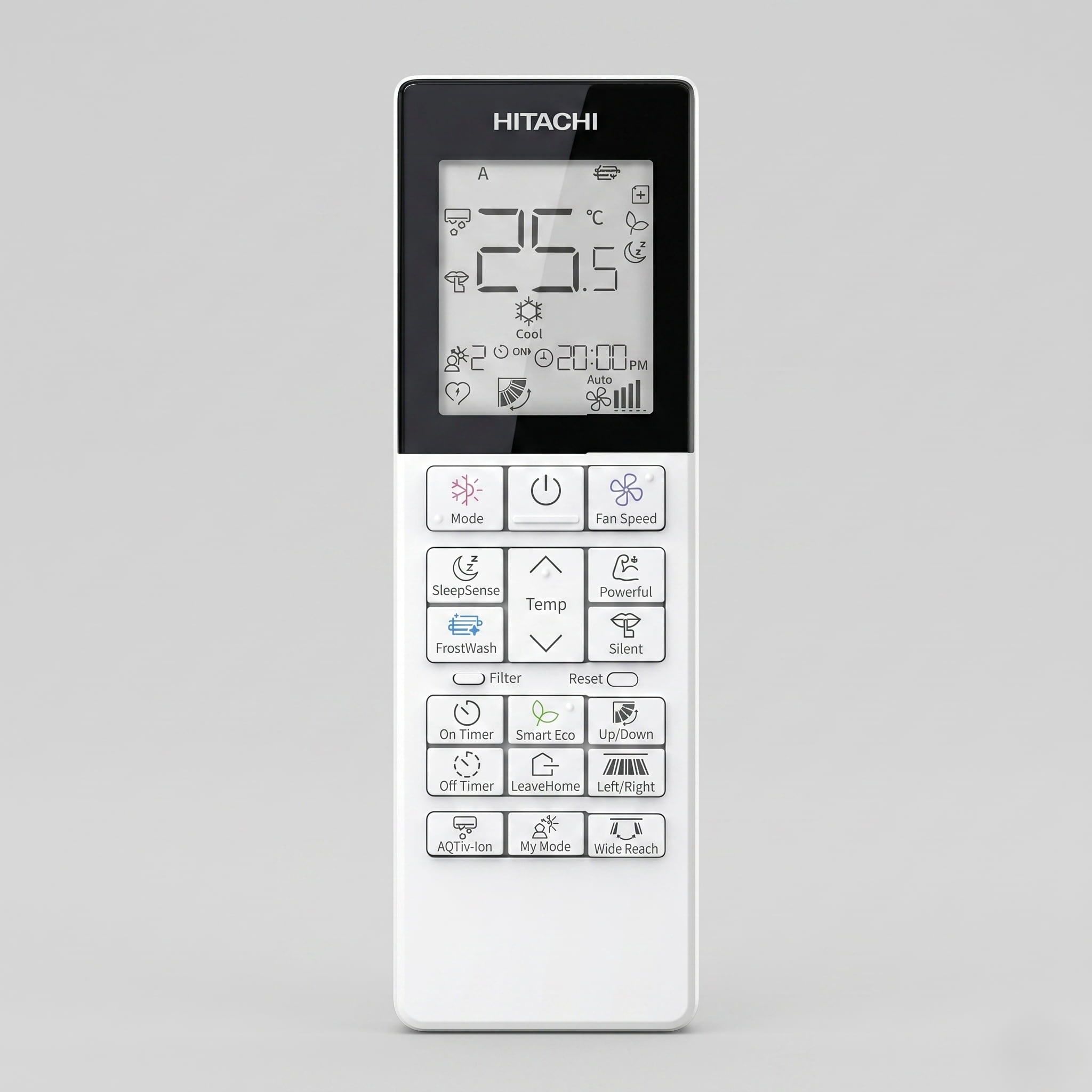
If your Hitachi heat pump remote has a button or symbol you haven't been able to identify, this guide covers it. It includes three functions that appear on Hitachi units only, and what to do when an indicator lamp starts behaving in a way you didn't expect.
For a cross-brand symbols reference covering Mitsubishi, Daikin, Fujitsu, and others in one place, the full guide is at what every symbol on your heat pump remote means.
For information on professional servicing for your Hitachi system, visit the heatpump servicing and clean page.
Jump to what you need
This guide covers the Hitachi airHome 400, 500, and 600 series wall-mounted units and the three remotes used across that range: RC-AGU1EA0G, RC-AGU1EA0A, and RC-AGS1EA0E. These are the residential hi-wall models most commonly found in NZ homes.
Hitachi's commercial and multi-split range uses different remotes with different button layouts. If your remote looks substantially different from the description below, it is likely from a different product line. The modes and symbols described here apply to the residential airHome range, but the feature set differs across the three series. The airHome 400 uses GoodSleep and a standard Eco button, and its swing control covers up and down only. The airHome 500 adds SleepSense in place of GoodSleep, upgrades to Smart Eco with an occupancy sensor, and adds left and right swing. The airHome 600 adds AQTiv-Ion, Wide Reach, and Mold Guard on top of the 500 series feature set. Where a button is visible on your remote but not described in your manual, confirm which series your indoor unit is from before assuming the feature is missing.
The indoor unit has four indicator lamps. Each covers a specific function, and each has multiple states. You've probably stopped checking them after the first week. Two of those lamps carry information worth knowing.
Lights up solidly when an On or Off timer is active. If the Timer lamp blinks, that is not a normal state. A blinking Timer lamp indicates a system fault. Count the number of blinks in the cycle and report that pattern when you contact a service agent.
The Clean lamp is the one people find most confusing, because it covers multiple functions. It lights up solidly during FrostWash, Auto Clean, and Mold Guard operations. It blinks in the 1 second on, 4 seconds off pattern when the filter needs cleaning. When you see that pattern, the filter is due. Cleaning the filter is not enough on its own. You also need to press the Filter Sign Reset button on the remote after cleaning, or the lamp keeps blinking.
Indicates the status of the built-in airCloud Home module. Three blinks means the unit is in AP pairing mode. Four blinks means it has completed a factory reset. Five blinks indicates a communication error.
Stays solidly lit during normal operation. If it flashes, the unit is in a normal holding state, either preheating during the first 2 to 3 minutes after startup or running an automatic defrost cycle. Defrost on Hitachi units runs for 5 to 10 minutes when frost forms on the outdoor coil. The flashing pattern during defrost is 2 seconds on, 1 second off. The unit resumes heating automatically once defrost is complete.
The green light on a Hitachi indoor unit is the Clean lamp. It has four distinct states, each meaning something different.
Solid green: A FrostWash, Auto Clean, or Mold Guard cycle is in progress. Leave the unit running. It will return to normal operation when the cycle is complete.
Blinking 1 second ON / 4 seconds OFF: The filter reminder. Your filter needs to be cleaned.
Blinking 1 second ON / 1 second OFF: FrostWash was requested but couldn't start because room conditions weren't right, or the 60-minute post-cycle lockout has not yet passed. Check the FrostWash conditions listed below and try again when conditions are met.
Blinking 4 seconds ON / 1 second OFF: FrostWash hasn't been run in an extended period. The unit is requesting that you run it manually.
The Timer lamp (orange) is the only lamp where blinking indicates a fault. A blinking green Clean lamp is not a fault. A blinking yellow Operation lamp is not a fault. A blinking orange Timer lamp is the one that needs attention.
The filter reminder resets via the Filter Sign Reset button on the remote, but only while the unit is in Off mode. Cleaning the filter and resetting the lamp are two separate steps. The lamp will keep blinking until both are done.
Here is the procedure:
First, clean the filter. Remove it, vacuum off loose dust, and rinse under warm water. Allow it to dry completely in shade, away from direct sunlight, before refitting. Never refit a damp filter. For a full step-by-step guide, see our heat pump filter cleaning guide.
Second, turn the unit off. The reset only registers while the unit is in Off mode.
Third, point the remote directly at the indoor unit and press the Filter Sign Reset button. The transmission sign on the remote LCD will blink and the unit will beep to confirm the reset was received.
If the lamp continues blinking, the most common cause is that the unit was still running when you pressed the button. Turn the unit off, wait a moment, and try again.
Here is what each symbol and button on the Hitachi airHome remote does.
Mode selector
Cycles through the five main operating modes. The LCD displays the mode name or icon each time you press it.
Heat (sun symbol): The unit heats the room to your set temperature. During cold weather, the outdoor unit runs a defrost cycle automatically, typically for 5 to 10 minutes at a time. The operation lamp flashes yellow during defrost. This is normal.
Cool (snowflake symbol): The unit cools the room down to your set temperature. If indoor humidity is above 80%, the manual notes that dew may form on the air outlet.
Auto (the letter A surrounded by arrows): The unit selects heating or cooling automatically to maintain your set temperature. Setting the mode manually to Heat in winter and Cool in summer is more efficient than leaving it in Auto, because Auto can switch to cooling on a warm winter afternoon when the sun heats the room above your set temperature.
Dry (water droplet symbol): Runs the unit at a low fan speed to reduce humidity. The dehumidifying function does not operate if room temperature is below 15°C. In NZ winters, this means dry mode is of limited use on cold mornings, which is the time most people reach for it. For a full explanation of what dry mode does and when to use it, see the heat pump dry mode guide.
Fan (fan blade symbol): Circulates air without heating or cooling. Useful for airing a room. Room temperature cannot be adjusted in fan mode.
Fan speed button
Changes the indoor fan speed. Options are Auto, Silent, Low, Medium, High, and Super High, displayed as stair-step bars on the LCD.
Temperature up/down buttons
Adjusts the target temperature. Holding the button down changes the value faster.
Up/Down swing button
Controls the angle of the horizontal air deflector, which directs airflow up and down. Do not adjust the deflector by hand. Moving the motorised louver manually can cause the gears to fail.
Left/Right swing button (airHome 500 and 600 only)
Controls the angle of the vertical air deflector, which directs airflow left and right. During cooling operation, do not leave this deflector at the leftmost or rightmost position for an extended period, and do not leave it swinging continuously. Doing so causes dew to form on the deflector and water to drip from the unit onto furniture below.
Powerful button
Runs the unit at maximum heating or cooling output and maximum fan speed until you cancel it or select a different mode.
Silent button
Sets the fan specifically to the Silent speed notch. This is a dedicated speed, not just a quiet version of whatever speed you were already using.
On Timer / Off Timer buttons
Program the unit to turn on or off at a specific time. The Timer lamp on the indoor unit (orange) lights up solidly when a timer is active and counting down.
GoodSleep button (airHome 400) / SleepSense button (airHome 500 and 600
These are two distinct functions that share a button position across the range.
GoodSleep on the airHome 400 works on a manual timer. When activated during any operating mode, it gradually shifts the room temperature and reduces fan speed over the number of hours you set, then shuts the unit off entirely when the timer ends.
SleepSense on the airHome 500 and 600 works differently. It uses a motion sensor to detect movement, location, and temperature around the people in the room, then adjusts the set temperature and fan speed dynamically to maintain a comfortable sleep environment. It runs continuously without an automatic shut-off timer.
If your remote has a SleepSense button, the unit is adjusting conditions based on what the sensor detects rather than following a fixed programme. If it is a GoodSleep button, you are setting a countdown.
Transmission sign
A small icon on the LCD, resembling radiating waves, that blinks whenever the remote is actively sending a signal to the indoor unit. If it blinks and the unit beeps, the command was received. If there is no beep from the unit, the signal did not land. Point the remote directly at the unit and try again.
Invalid Operation sign
A circle with a diagonal slash that appears on the LCD when you attempt a setting or combination the unit cannot accept. This is a Hitachi-specific feature. Mitsubishi Electric and Daikin typically respond to invalid commands with a beep or flashing error light from the indoor unit. Hitachi shows you directly on the remote screen.
Reset button
A recessed button requiring a pen tip to press. Used to reset the remote hardware after changing batteries. See the FAQ below for what happens to your saved settings when you press it.
Three features on the Hitachi airHome remote have no direct equivalent on any other brand sold in NZ. If you've pressed these buttons without knowing what they do, here is what they actually are.
My Mode
My Mode is a multi-profile memory system. It lets you save up to three personalised settings to the remote, each storing your preferred combination of operating mode, temperature, fan speed, and timer. The symbol is the text "My Mode" or a person silhouette next to the numbers 1, 2, and 3.
To use it: configure the unit exactly how you want it, then save that combination to My Mode 1, 2, or 3. Pressing the relevant My Mode button recalls those settings instantly, without adjusting each one individually.
Other brands offer something similar in a limited form. Mitsubishi Electric has a single i-save profile. Daikin has a single Home Leave mode on floor-standing units only. Hitachi is the only brand in the NZ market with three distinct saved profiles on the handheld remote.
FrostWash
FrostWash is a self-cleaning function. The unit intentionally freezes the internal coil, then melts that ice to flush accumulated dust and organic matter from the heat exchanger. The symbol is a snowflake overlapping a water drop, or the text "FrostWash."
When FrostWash runs, the Clean lamp on the indoor unit (green) lights up solidly. If the green lamp blinks at 1 second ON followed by 1 second OFF, FrostWash was requested but room conditions were wrong for it to start. If the green lamp blinks at 4 seconds ON followed by 1 second OFF, FrostWash hasn't been run in a long time and the unit is requesting manual activation.
FrostWash will not run under certain conditions. Outdoor temperature must be between 1°C and 43°C. Indoor room temperature must be between 10°C and 32°C. Indoor humidity must be between 30% and 70%. If any of these conditions are not met when you press the FrostWash button, the Clean lamp blinks 1 second ON / 1 second OFF for 10 seconds and the cycle does not start. This is the most common reason owners find FrostWash does not respond to a button press on a cold NZ morning.
After a FrostWash cycle completes, the unit locks out the function for 60 minutes to protect the components. Pressing FrostWash during this window triggers the same 1 second ON / 1 second OFF blink pattern.
If FrostWash is running and you are not sure why, leave the unit on. Interrupting the cycle leaves the coil partially cleaned. The unit returns to normal operation automatically once the cycle is complete.
FrostWash addresses surface contamination on the internal coil. It does not replace a full professional service, which accesses the fan housing, drain system, and external coil.
Auto Clean (airHome 500) / Mold Guard (airHome 600)
These are the same internal drying function under different names. After the unit runs in cooling or dry mode for more than 10 minutes and is then switched off, a 60-minute fan cycle starts automatically to dry the internal components and reduce the conditions that allow mould to develop inside the unit. The green Clean lamp on the indoor unit lights up while the cycle is running.
To enable or disable the function: hold the Temperature Up button and the On Timer button simultaneously for three seconds while the remote is in Off mode.
This function does not appear on the airHome 400 series.
Smart Eco (airHome 500 and 600) / Eco (airHome 400)
The airHome 500 and 600 series use Smart Eco, which has an occupancy sensor inside the indoor unit to detect whether anyone is in the room. If the room is empty, it adjusts the set temperature to reduce power consumption. If the room stays empty long enough, it can power the unit down.
The airHome 400 series uses a standard Eco button without the occupancy sensor. It caps compressor output to reduce power use but does not detect whether the room is occupied.
On both versions, the function caps compressor output. On cold days in NZ, the system may not reach your set temperature while Eco or Smart Eco is active. If you're running the unit hard in winter and it's not hitting the temperature you've set, switching this off is the first thing to check.
LeaveHome button
Activates a frost-protection heating mode for when the home is unoccupied. The default target temperature is 10°C, adjustable up to 16°C using the temperature buttons. The letter G appears on the LCD when LeaveHome is active. To cancel: press LeaveHome again, press On/Off, or select a different operating mode.
While LeaveHome is running, fan speed and air deflector position cannot be changed. Any active timers are cancelled. Powerful, SleepSense, Smart Eco, Silent, and My Mode are all disabled. This is a standard feature across the airHome 400, 500, and 600 range.
AQTiv-Ion button (airHome 600 only)
Activates Hitachi's ion generation function while the unit is running. Press the AQTiv-Ion button during Heat, Auto, Cool, Dry, or Fan operation and the AQTiv-Ion icon appears on the LCD. Press the button again to cancel. AQTiv-Ion cannot run while the unit is off. This feature is available on the airHome 600 series only.
Wide Reach button (airHome 600 only)
Controls a specific swing pattern for the vertical air deflectors. When Wide Reach is active, the deflectors split and swing outward symmetrically to spread airflow wider across the room. This differs from the standard Left/Right button, which moves all deflectors in the same direction in parallel. Press Wide Reach once to start the pattern. Press it again to stop the deflectors at their current position. Wide Reach is available on the airHome 600 series only.
This is normal. The Hitachi airHome 400 manual states directly: "If you press the FUNCTION button during operation, the air conditioner may stop for about 3 minutes for protection before you can start it again."
When you press the Mode Selector button while the unit is running, it may stop for approximately three minutes before restarting in the new mode. The pause is a compressor protection feature that prevents damage from rapid mode-switching.
The three-minute lockout catches people off guard because there is no obvious indication on the unit that it is waiting rather than broken. The operation lamp stays on. The remote screen updates to the new mode. The unit does not blow air.
The correct response is to wait. The unit restarts automatically once the protection period has passed. Pressing the Mode button again during those three minutes resets the clock and extends the wait. Pressing the On/Off button cancels the operation entirely and you start again from scratch. If your remote is not responding at all, see heat pump remote not working or lost for battery, signal, and replacement troubleshooting.
Hitachi's residential app is airCloud Home, available for iOS and Android. Once connected, it allows you to control your airHome unit remotely, set schedules, and monitor operation.
Setup requirements for initial pairing are detailed in the airCloud Home app itself rather than the remote operation manual. If pairing fails, follow the in-app troubleshooting steps. The Wi-Fi lamp states described above will tell you where in the connection process the unit is.
If pairing fails after following the in-app steps, power-cycling the indoor unit and restarting the setup process resolves most connection issues.
Every six to twelve months, depending on how heavily the system is used. The Hitachi airHome operation manual states that checks should be carried out by qualified service personnel either every six months or every year. These checks cover the air filter condition, heat exchanger condition, drainage system, refrigerant line connections, and electrical components.
The six-month interval applies to units in high-use environments or running significant cooling cycles. For most NZ residential installs used primarily for heating in winter, an annual professional service is the appropriate interval.
Here is what Hitachi's own airHome 400 manual says about blocked filters: "In case the air filter is full of dust, the air flow will decrease and the cooling capacity will be reduced. Further, noise may occur." Reduced airflow and reduced output are measurable performance losses. The difference on any single bill is small. Across a winter it adds up.
That is the Set and Forget Cost. A system running with a blocked filter uses more electricity to produce less heat. The filter reminder on the indoor unit tells you when to clean. It cannot tell you about the condition of the internal fan housing, the drain pan, or the internal coil. Those require a professional service.
Your remote shows you mode, temperature, fan speed, and timer status. What it cannot show you is the condition of the components inside the unit.
The internal fan housing accumulates a layer of organic matter over time that a filter clean does not touch. The drain pan can develop blockages that cause moisture to back up into the unit. The internal coil builds up contamination that affects how efficiently heat transfers between the air and the refrigerant. These components determine how much usable heat the unit produces per unit of electricity. None of them are accessible without opening the unit.
FrostWash addresses the coil surface. Filter cleaning addresses the filter only. A professional service works through all of these components in a single visit.
The water drop symbol means the unit is in dry mode, which reduces humidity by running at a low fan speed with a gentle cooling effect. On Hitachi units, the dehumidifying function does not operate when room temperature is below 15°C. In NZ winters, dry mode on a cold morning will cool the room without meaningfully reducing humidity.
Smart Eco uses an occupancy sensor to detect whether anyone is in the room and adjusts the set temperature to reduce power use when the room is empty. It caps compressor output, which means on very cold days the system may not reach your set temperature while it is active. If you're not hitting your target temperature in winter, switching Smart Eco off is the first thing to check.
Set the unit to your preferred mode, temperature, and fan speed, then hold the My Mode 1, 2, or 3 button until the setting is saved. Pressing that button later recalls those settings instantly. Each of the three slots stores a completely independent combination of settings. Check your specific airHome manual for the exact save button sequence, as it varies slightly between remote models.
The FrostWash symbol is a snowflake overlapping a water droplet, or the text "FrostWash." When activated, the unit freezes the internal heat exchanger then melts the ice to flush accumulated dust and organic matter from the coil. FrostWash addresses the coil surface. It does not reach the fan housing, drain pan, or other internal components that require a professional service.
The dehumidifying function on a Hitachi heat pump does not operate when room temperature is below 15°C. In cooler NZ rooms in winter, the unit may be running dry mode but producing little or no dehumidification. A standalone desiccant dehumidifier is more effective for winter moisture removal because it adds heat back into the room rather than removing it.
The Invalid Operation sign is a circle with a diagonal slash that appears on the remote LCD when you attempt a setting the unit cannot accept. It is a Hitachi-specific feature. Most other brands signal an invalid command through the indoor unit beeping rather than displaying a symbol on the remote screen.
No. In dry mode, the fan speed is set automatically by the unit to maintain effective humidity control. Manual fan speed adjustment is not available while dry mode is active.
The most likely cause is the position of the vertical air deflector. During cooling operation, leaving the deflector at the leftmost or rightmost position, or leaving it swinging continuously, causes dew to form on the deflector and drip from the unit. Use the remote to set the deflector to a central position during cooling.
Pressing the recessed Reset button with a pen tip resets the remote hardware and returns the display to the default screen. The Hitachi airHome manuals confirm the hardware resets but do not state whether saved My Mode profiles are retained. Check your specific airHome manual or test by saving a profile before and after a reset to confirm behaviour on your model.
Setting the mode manually to Heat in winter and Cool in summer is more efficient than leaving it in Auto. In Auto mode, if the room warms above your set temperature on a sunny winter afternoon, the unit can switch to cooling to bring the temperature back down, which wastes power. Manual mode selection avoids this.
The button combination to toggle between Celsius and Fahrenheit varies by brand and by remote model. Check the combination button section of your specific Hitachi airHome operation manual for the correct method. Do not use another brand's combination as a guide — the sequences are brand-specific.
A blinking Timer lamp (orange) on a Hitachi indoor unit indicates a system fault. A blinking Operation lamp (yellow) and a blinking Clean lamp (green) both have normal explanations. A blinking Timer lamp does not. Count the number of blinks in the cycle before turning anything off, and report that pattern to a service agent.
Download the airCloud Home app and follow the in-app setup instructions. If pairing fails, use the in-app troubleshooting steps and check the Wi-Fi lamp on the indoor unit: three blinks means the unit is in pairing mode and ready to connect, five blinks indicates a communication error.
GoodSleep appears on the airHome 400 series and works on a timer you set manually. It gradually shifts the temperature and reduces fan speed over the set number of hours, then turns the unit off. SleepSense appears on the airHome 500 and 600 series and uses a motion sensor to adjust temperature and fan speed dynamically based on movement in the room. It runs continuously without shutting the unit off. The button occupies the same position on both remotes but the two functions work differently.
FrostWash will not run if outdoor temperature is below 1°C or above 43°C, if indoor room temperature is below 10°C or above 32°C, or if indoor humidity is below 30% or above 70%. On a cold NZ morning all three indoor conditions can be outside the operating range simultaneously. FrostWash also locks out for 60 minutes after a completed cycle. When any of these conditions prevent the cycle from starting, the green Clean lamp blinks 1 second ON followed by 1 second OFF for 10 seconds.
Both are the same function under different names. Auto Clean appears on the airHome 500 series. Mold Guard appears on the airHome 600 series. After the unit runs in cooling or dry mode for more than 10 minutes and is switched off, a 60-minute fan cycle starts automatically to dry the internal components. The green Clean lamp lights up while the cycle runs. The function does not appear on the airHome 400 series.
Yes. The airHome range includes an Operation Mode Lock function that restricts the remote to heating only, or to cooling and dry only. It is activated by holding the Mode button and the Temperature Down button simultaneously for three seconds while the remote is in Off mode. This is useful for rental properties where you want to prevent tenants from switching between modes.
LeaveHome activates a frost-protection heating mode that keeps the room from dropping below a set minimum temperature while the home is unoccupied. The default is 10°C, adjustable up to 16°C. The unit runs in low-level heating and locks out fan speed, deflector adjustments, timers, and smart features like Smart Eco and Powerful while the mode is active. Press LeaveHome again, press On/Off, or select a different mode to cancel it. LeaveHome is available across the full airHome 400, 500, and 600 range.