Before you go...
We built a free scorecard that shows how your heat pump, ventilation and solar systems are performing. Results are usually surprising.
Get my score
No thanks
We built a free scorecard that shows how your heat pump, ventilation and solar systems are performing. Results are usually surprising.
No thanksWe built a free scorecard that shows how your heat pump, ventilation and solar systems are performing. Results are usually surprising.
No thanks
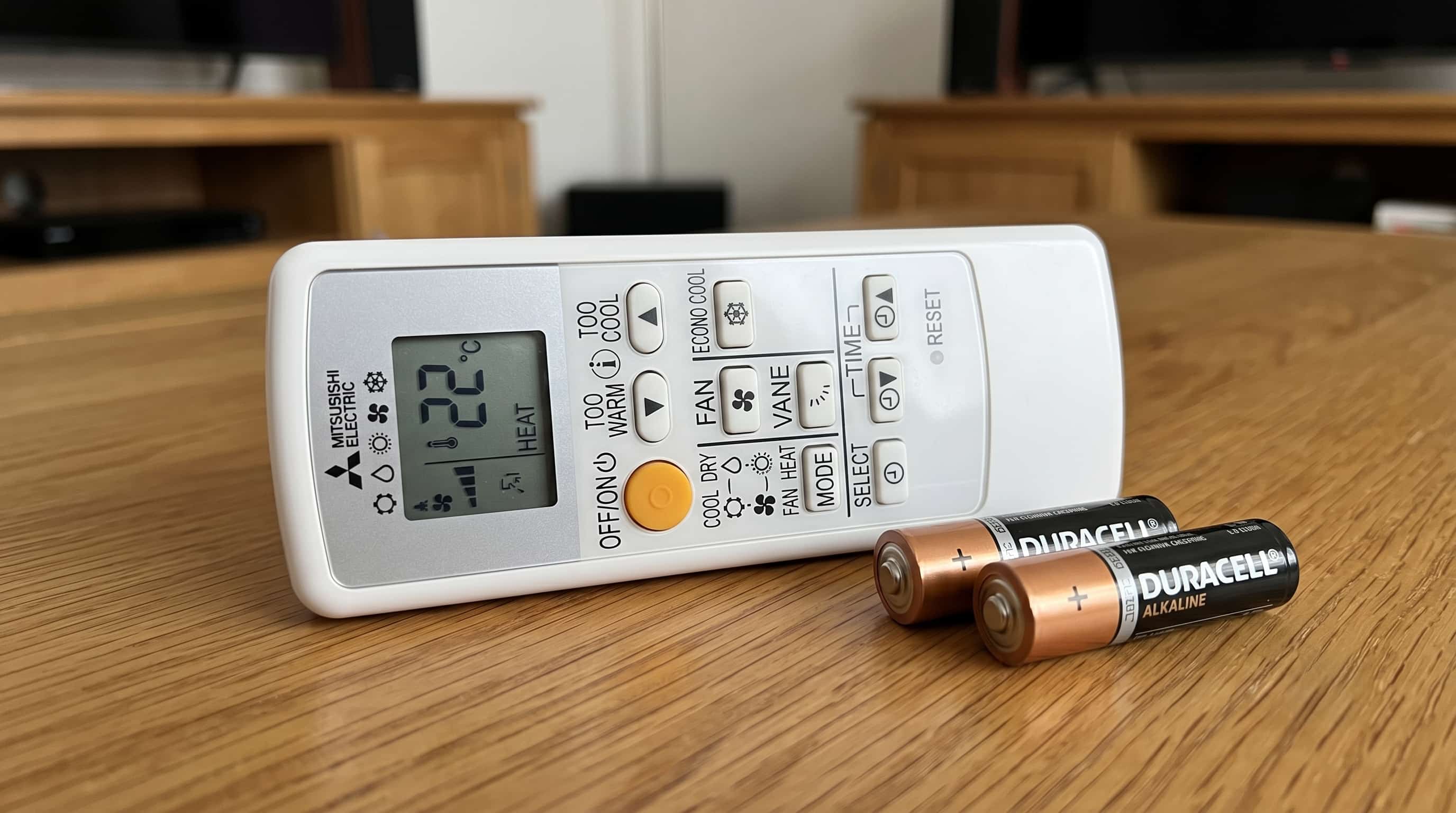
Your heat pump remote has stopped working or you cannot find it anywhere. Two different problems, but the first question is the same for both: can you still use the unit?
Yes. Every hi-wall heat pump has a manual On button on the indoor unit itself. Here is how to use it, and what comes after.
Every hi-wall heat pump unit has a manual On button built into the indoor unit. It is usually located under the front panel on the right-hand side, or along the bottom edge of the unit. On some models there is a small cover or tab you press to access it. Press the button once and the unit will start in automatic mode, running at a fixed temperature, typically around 22 to 24 degrees Celsius.
This gives you a working unit right now, without the remote. You will not have mode or temperature control, but the unit will run and heat or cool the space.
If the unit does not respond to the manual button, that is a different problem. The unit itself may have a fault, which is separate from a remote issue entirely.
The manual button is a short-term fix. For full control you have three options, listed from fastest to most complete.
A universal remote is the quickest route. NZ-based online retailers stock brand-specific universal remotes for all the major brands sold here, including Mitsubishi, Daikin, Fujitsu, Hitachi, Panasonic, Toshiba, Gree, and others. Search "universal remote controls NZ" and you will find options with same-day dispatch from local warehouses. A universal remote covers mode selection, temperature, and fan speed, which is everything most people need day to day. What it does not cover is brand-specific advanced features. For a full explanation of every mode, symbol, and brand-specific function, see what every symbol on your heat pump remote means. Mitsubishi Electric's Night mode, Rinnai's humidity control during dry mode, and Fujitsu's Demand Response settings will not transfer to a universal remote. For standard daily use, a universal remote works well.
A wifi control app replaces the remote entirely if your unit has wifi capability. If your heat pump was installed in the last five to seven years, it may already support this. Check whether there is a wifi symbol on the indoor unit's display panel. If there is, your unit can be controlled from your phone once the app is set up. Every major brand in NZ has an app: Mitsubishi Electric uses MELCloud, Daikin uses the Daikin Online Controller, Fujitsu uses FGLair, Hitachi uses airCloud Home, Panasonic uses Comfort Cloud, Toshiba uses Toshiba Home AC Control, Samsung uses SmartThings, LG uses ThinQ, and Rinnai uses AC Freedom for Q-Series models or NetHome Plus for Pro Series. Every brand requires a 2.4GHz router for the initial pairing, not 5GHz. Contact your brand's NZ distributor or installer if you are unsure whether your unit supports wifi.
A brand-matched replacement remote is the correct long-term solution and restores full functionality. The model number on the indoor unit is what you need, not the remote model number. It is on a sticker inside the filter access door or on the front panel. Take that to your brand's NZ distributor or an authorised service agent and they will match the correct remote to your unit. Pricing from NZ distributors generally sits somewhere between $80 and $250 depending on the brand and model. Contact your distributor for a current price before ordering.
One Mitsubishi note: Mitsubishi Electric and Mitsubishi Heavy Industries are different companies with different remotes and different distributors. If your indoor unit has Bronte Series, Avanti Plus, or Ciara Series on the nameplate, that is Mitsubishi Heavy Industries. If the model number starts with MSZ, that is Mitsubishi Electric. Contact the right distributor or you will receive the wrong remote.
Do not order remotes from offshore suppliers without confirming NZ compatibility. Regional frequency settings and feature sets vary. A remote sourced from Australia or Asia may not pair correctly with a NZ-spec unit.
If the remote is still in your hands but the unit is not responding, the most common cause is flat batteries.
The complication is that a remote with dying batteries does not always look broken. The display lights up, the buttons work fine, but the infrared signal is too weak to reach the receiver on the indoor unit. The unit does not respond and the remote appears to have failed when the batteries are simply exhausted.
Replace the batteries with a fresh set before anything else. Most NZ heat pump remotes take two AA batteries. Open the compartment on the back, swap them out, point the remote directly at the indoor unit from within two metres, and press the On button. Wait for the beep from the unit confirming it received the signal.
Mitsubishi Electric, Fujitsu, and Hitachi remotes require one extra step after a battery change. All three require you to press a recessed reset button after the new batteries go in. Use a ballpoint pen tip or a pin to press the small hole on the back of the remote. On Mitsubishi Electric and Fujitsu remotes, this reset clears any saved timer settings, so you will need to reprogram them. On Hitachi, the reset clears general hardware settings but retains any special functions you had activated.
If you skip this step on those three brands, the remote will not work even with fresh batteries. That is the cause of a significant number of "broken remote" calls.
One Panasonic note: Panasonic manuals specifically warn against using Ni-Cd rechargeable batteries. Use standard alkaline batteries in any Panasonic remote.
If fresh batteries and the reset step have not resolved it, you need to know whether the remote is transmitting at all before deciding whether to replace it.
Open the camera app on your phone, point the front-facing lens at the transmitter end of the remote (the end you normally aim at the unit), and press any button while watching the phone screen. A working infrared transmitter shows as a brief white or purple flash on the camera display. You cannot see infrared light directly, but the phone sensor picks it up.
If you see the flash, the remote is transmitting. The problem is not the remote. If there is no flash at all, the transmitter has failed and the remote needs to be replaced. Use the options in the "If your remote is lost" section above.
The most common cause is signal interference or a sync problem between the remote and the unit.
The infrared receiver on the indoor unit is a small sensor, usually positioned behind the front display panel. Direct sunlight on the receiver can blind it temporarily. Older inverter-type fluorescent lights can drown out the signal. Flat-panel televisions pointed in the same direction can also interfere. If any of these apply, shade the receiver from the light source and test again.
The second common cause is that the remote and the unit have fallen out of sync. This happens when you change settings on the remote while not pointing it directly at the unit. The remote screen updates but the unit never received the command, because there was no confirming beep. The remote shows one temperature and mode. The unit is running at something different. Switch the unit off using the manual button on the indoor unit itself. Then switch it back on from the remote, aiming directly at the unit and waiting for the beep before pressing anything else.
If the unit has flashing lights showing, that is a separate path. A flashing fault indicator means the unit has detected an internal condition and entered a protective state. A new remote will not resolve a flashing fault. The fault needs to be identified and addressed first.
If your unit responds to the remote but is not performing the way it used to, the remote is not the issue.
This catches owners who have been adjusting settings trying to get a better result from the unit and have started to wonder whether the remote is the problem. It is not. The unit is receiving the instruction correctly. The problem is what the system can actually deliver.
Major NZ heat pump manufacturers' owner documentation recommends professional servicing every one to two years. A system that has gone three or more years without a heatpump service and cleaning visit can accumulate organic growth on the internal fan and contamination on the internal coil. Both directly reduce the unit's ability to transfer heat. The set temperature on the remote becomes disconnected from what the system can actually achieve. The unit runs, the remote works, and the room stays cold.
If that describes your situation, a service assessment will tell you what is happening inside the unit and whether the performance gap is recoverable.
Most NZ heat pump remotes take two AA batteries. Some smaller remotes take AAA batteries. Check the battery compartment cover on the back of the remote. Panasonic remotes require standard alkaline batteries specifically. Do not use Ni-Cd rechargeable batteries in a Panasonic remote.
Mitsubishi Electric, Fujitsu, and Hitachi remotes require a recessed reset button to be pressed after a battery change. Use a ballpoint pen tip to press the small reset hole on the back of the remote. On Mitsubishi Electric and Fujitsu remotes, the reset clears any saved timer settings. On Hitachi, special functions are retained after the reset. Skipping this step is the most common reason these remotes fail to work after a battery swap.
Open the camera app on your phone, point the front lens at the transmitter end of the remote, and press any button. A working infrared transmitter shows as a white or purple flash on the camera screen. No flash means the transmitter has failed and the remote needs replacing. A visible flash means the remote is transmitting and the problem is somewhere else.
Yes, for standard daily functions. Universal remotes available in NZ cover mode selection, temperature, and fan speed across most major brands. Brand-specific features such as Night mode on Mitsubishi Electric, humidity control on Rinnai during dry mode, or Demand Response settings on Fujitsu will not transfer to a universal remote. For full functionality, a brand-matched replacement from the NZ distributor is the right option.
Every hi-wall heat pump has a manual On button on the indoor unit, usually under the front panel on the right-hand side or along the bottom edge. Press it once and the unit runs in automatic mode at a fixed temperature. You will not have mode or temperature control, but the unit will operate. For full control, source a replacement remote or set up wifi control through your brand's app if the unit supports it.
This is a compressor protection feature built into most brands. If the unit was switched off and turned back on immediately, or if modes were switched quickly, the unit locks the compressor for approximately three minutes before starting. The beep confirms it received the remote signal. The unit will start once the protection window clears.
The most likely cause is that the TEST RUN button on the indoor unit has been pressed accidentally. On Fujitsu ASTG series units, this recessed button activates a diagnostic mode intended for use by service technicians during installation. In that mode the unit ignores thermostat settings and does not respond to the remote normally. Have an authorised technician reset the unit. Do not attempt to activate or cancel TEST RUN yourself.
This is a system condition, not a remote fault. A heat pump that responds to the remote but underperforms is likely running with contamination on the internal components that limits heat transfer. The remote is working correctly. The system cannot deliver what is being asked. A professional service will identify whether the performance gap is maintenance-related and whether it is recoverable.
Brand-matched replacement remotes from NZ distributors or authorised agents generally range somewhere between $80 and $250 depending on the brand and model. Contact your distributor for a current price before ordering. Universal remotes from NZ online retailers are cheaper and work for standard functions, but brand-specific features will not carry across.
The HEALTH button on Rinnai remotes doubles as the wifi module reset. On Q-Series models, pressing it eight times resets the wifi and puts the unit into pairing mode. On Pro Series models, press the LED or Do Not Disturb button seven times instead. Nothing on the button label indicates this function. The pairing window is eight minutes. If you do not complete the setup in that time, restart the unit and begin again.