Before you go...
We built a free scorecard that shows how your heat pump, ventilation and solar systems are performing. Results are usually surprising.
Get my score
No thanks
We built a free scorecard that shows how your heat pump, ventilation and solar systems are performing. Results are usually surprising.
No thanksWe built a free scorecard that shows how your heat pump, ventilation and solar systems are performing. Results are usually surprising.
No thanks
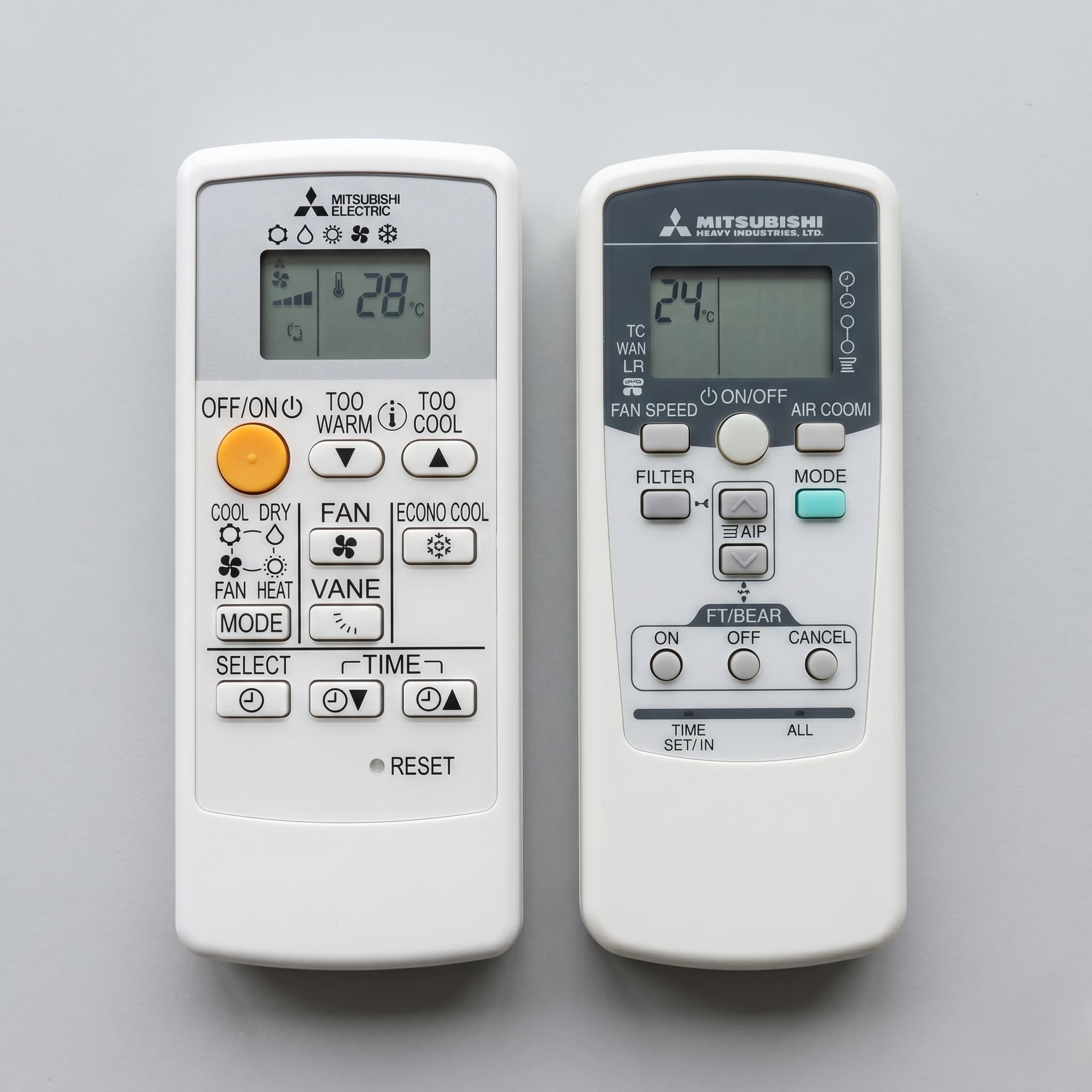
If your heat pump or air conditioner says Mitsubishi on the front, this guide is for you. It covers every symbol on the remote, what the modes actually do, and the features specific to each brand. Mitsubishi Electric and Mitsubishi Heavy Industries are separate companies with different remotes and different apps.
Yes. A heat pump is a type of air conditioner that can also run in reverse to heat a room, and in New Zealand the two names are used for the same unit. Everything on this page about symbols, modes, and remote settings applies whether you call your Mitsubishi system a heat pump or an air conditioner.
Mitsubishi Electric and Mitsubishi Heavy Industries are separate companies with different units, different remotes, and different apps. Here is how to tell which one you have.
Mitsubishi Electric units are the more common of the two in New Zealand. The indoor unit will have "Mitsubishi Electric" printed on the front panel, often with the model number starting with MSZ.
Mitsubishi Heavy Industries units are sold in New Zealand under three series names: Bronte, Avanti Plus, and Ciara. The front panel will say "Mitsubishi Heavy Industries" or display the series name rather than the Mitsubishi Electric branding.
If you have a Mitsubishi Heavy Industries unit, the sections below on modes and symbols still apply to the main operating modes, but the remote layout, specific features, and app are different. There is a dedicated MHI section further down covering what you need to know.
The Mitsubishi Electric remote controls heating, cooling, airflow, and scheduling from a single handheld unit. For a full cross-brand explanation of what each symbol means across all NZ brands, see the heat pump remote symbols NZ guide.
The five main mode symbols below apply to both Mitsubishi Electric and Mitsubishi Heavy Industries units. The additional features described in this section — ECONO COOL, NIGHT MODE, i-Save, and i-See — are Mitsubishi Electric specific unless stated otherwise.
The main mode symbols are:
HEAT — a sun with radiating rays. Selects heating mode. The indoor unit takes a few minutes at startup before blowing warm air, while the heat exchanger reaches operating temperature. This avoids sending cold air into the room. It is normal.
COOL — a six-pointed snowflake. Selects cooling mode.
DRY — a water droplet or cluster of droplets. Runs the unit in dehumidify mode at low fan speed. In New Zealand's cold winters, dry mode makes the room cold. It is designed for hot, humid conditions. For a full explanation of what dry mode does and when to use it in NZ, see the heat pump dry mode guide.
AUTO — a circle made of arrows, or the letter A enclosed in arrows. The unit monitors room temperature and switches between heating and cooling to maintain the set temperature. In NZ winters, afternoon sun can push room temperature up briefly, which may trigger the unit to start cooling. For most NZ winters, setting the mode manually to HEAT gives more predictable results than relying on AUTO.
FAN — a multi-blade fan propeller. Circulates air without heating or cooling. The room temperature cannot be adjusted in this mode.
The fan speed button cycles through speed settings including a Quiet option, which runs the indoor fan at a lower speed than the standard Low setting. Quiet mode reduces noise but slows how quickly the room reaches the set temperature.
The VANE button controls the vertical airflow direction. There are five manual positions plus Auto and Swing. In Auto, the unit selects the most efficient angle: horizontal for cooling, angled downward for heating. In Swing, the vane moves continuously up and down.
The WIDE VANE button controls horizontal airflow direction across five positions plus a continuous side-to-side Swing.
Your Mitsubishi Electric remote has more settings than the five main modes above. Fan speed, vane angle and timer scheduling all shape how the system actually performs day to day. The sections below cover the vane and wide vane controls, and the hidden timer buttons under the sliding lid, in detail.
The sun and the snowflake
Both the sun and snowflake are round with radiating points, which makes them easy to confuse at a glance. The sun means heat. The snowflake means cool. The symbol represents what you want the air to feel like, not the current weather outside.
NIGHT MODE
The crescent moon button is labelled NIGHT MODE on remotes that carry it. You might assume it works like a sleep function that gradually adjusts the temperature overnight. It does not. NIGHT MODE dims the indicator lights on the indoor unit, disables the beep sound, and reduces outdoor unit noise. The temperature does not change. If you want the room to cool or warm gradually while you sleep, you need to use the timer function, not NIGHT MODE.
NIGHT MODE is available on MSZ-AP and MSZ-LN series remotes. If your remote does not have a crescent moon button, your model does not have this feature.
ECONO COOL
ECONO COOL is a Mitsubishi Electric cooling-only function. It automatically raises the set temperature by 2°C and compensates by running a specific vertical swing airflow pattern. The moving air makes the room feel cooler than the actual temperature, which allows the system to use less energy. ECONO COOL is not an economy mode for heating. It does not apply in winter.
ECO mode
On Mitsubishi Electric units, ECO mode limits the compressor to reduce energy consumption. It works well in moderate conditions. If the room is not reaching your set temperature and ECO is on, try turning ECO off first.
On Mitsubishi Heavy Industries units, ECO mode works differently. It raises the set temperature slightly in cooling mode and lowers it slightly in heating mode to soften the load rather than capping the compressor directly. See the MHI section further down for more detail.
AUTO mode in NZ winters
AUTO mode switches between heating and cooling based on room temperature. During NZ winters, afternoon sun can push room temperature up briefly and trigger a switch to cooling. Setting the mode manually to HEAT and leaving it there gives more predictable results.
The lower half of the Mitsubishi Electric remote slides downward to reveal a second panel of buttons. These are not visible during normal operation and are easy to miss entirely.
Behind the sliding lid are the timer and scheduling controls: ON timer, OFF timer, DAY, EDIT/SEND, SET, and CANCEL. These allow you to program the unit to turn on or off at set times on specific days.
Also behind the lid or recessed into the remote casing are the CLOCK and RESET buttons. Both are physically recessed and require a thin instrument such as the tip of a pen to press. The RESET button is covered in the next section.
The i-Save button stores your preferred temperature, fan speed, and airflow direction as a preset. Pressing it once recalls that preset instantly. Pressing it again returns the unit to the previous settings. In HEAT mode, i-Save allows the minimum temperature to be set as low as 10°C, below the standard 16°C floor. This makes it useful for maintaining an unoccupied room at a safe minimum temperature without running the system at full heating capacity. i-Save stores separate presets for cooling and heating.
Mitsubishi Electric units have a filter indicator light on the indoor unit. A flashing filter lamp is a cleaning reminder. It is not a fault. The unit is telling you the air filter is due for cleaning.
To clear the light, follow how to clean mitsubishi heat pump filter, then let it dry completely before refitting. Never refit a damp filter. Once the filter is back in place, press the filter reset button on your remote or on the indoor unit to turn the lamp off. The light will not clear on its own after cleaning. The reset button must be pressed.
If you have a Mitsubishi Heavy Industries unit, see the filter cleaning note in the MHI section below.
If you change the batteries in your Mitsubishi Electric remote and find it does not work correctly afterward, the remote needs to be reset. This is a documented requirement, not a fault.
After inserting fresh batteries, use a thin instrument to press the recessed RESET button inside the remote casing. On most ME remotes this button sits behind the sliding lower lid or in a small recess on the side of the unit. Without pressing RESET, the remote may not operate correctly even with new batteries.
Note that pressing RESET clears the remote's stored settings. You will need to re-enter any scheduled programmes after a battery change.
If you have a Mitsubishi Heavy Industries unit, the equivalent step is the ACL switch — covered in the MHI section below.
The following flashing light states apply to Mitsubishi Electric units. Mitsubishi Heavy Industries units use a different indicator system — see the MHI section below. Most flashing light states on a Mitsubishi Electric unit are normal operational behaviour, not faults.
Upper operation lamp blinking, lower lamp lit — Demand Response Mode is active. This is triggered by your electricity retailer, not by the unit itself.
All LED lamps blinking — the horizontal louver vanes have not been installed correctly. Check that the vanes are clicked into their mounting points.
Operation lamp blinking rapidly — the self-diagnosis function has activated to protect the unit. Turn off the power switch immediately and contact a service provider. Do not attempt to restart the unit yourself.
Mitsubishi Heavy Industries units share the same core heating and cooling modes as Mitsubishi Electric — HEAT, COOL, DRY, AUTO, FAN — with the same basic symbols. The differences are in the features, the remote layout, and the app.
Key differences from Mitsubishi Electric
HI POWER and ECO share a single toggle button on MHI remotes, cycling between the two modes. On ME remotes these are separate buttons.
ECO mode on MHI units operates differently from ME. In cooling mode, ECO raises the set temperature slightly to reduce the load. In heating mode, it lowers the set temperature slightly. The result is softer, more economical operation rather than a hard cap on compressor output.
NIGHT SETBACK is an MHI-specific function. It maintains the room at a low minimum temperature when the house is unoccupied. This is useful for preventing pipes from freezing over winter without leaving the system running at full heating.
Allergen Clear is an MHI-exclusive 90-minute standalone cycle that uses enzyme technology on the allergen clear filter to deactivate allergens on the filter before drying the internal components. It is not a continuous air purification mode. It halts normal heating and cooling while it runs. MHI manuals recommend running it when no one is in the room, as the room temperature can change significantly during the cycle.
3D Auto moves both the vertical and horizontal vanes at the same time in a set pattern so air reaches more of the room. On ME remotes, vertical and horizontal swing are controlled separately.
Cleaning the filter on an MHI unit
Mitsubishi Heavy Industries units do not have a filter indicator light. The MHI manuals instruct owners to clean the air filters on a calendar schedule rather than waiting for an indicator. Remove the filter, wash it, let it dry completely, and refit it. There is no reset button to press after cleaning.
The ACL reset switch
MHI remotes have a recessed ACL switch that works the same way as the ME recessed RESET button. After changing batteries, press the ACL switch with a ballpoint pen to restore correct remote operation.
Flashing lights on MHI units
Mitsubishi Heavy Industries units use a different indicator system from Mitsubishi Electric. The RUN light and TIMER light are the primary status indicators on MHI indoor units.
RUN light blinking slowly — the unit is pre-heating the coil to prevent cold drafts, or the outdoor unit is running an automatic defrost cycle. Wait a few minutes for normal operation to resume.
RUN and TIMER lights blinking alternately — Demand Response mode is active. This is triggered by your electricity retailer.
RUN and TIMER lights blinking quickly together — a fault has occurred. Turn off the power and contact a service provider. If the blinking continues after restart, do not continue running the unit.
MHI units use the Smart M-Air app, not the Mitsubishi Electric Wi-Fi Control app or MELCloud. If you attempt to connect an MHI unit using the ME app, it will not work. The two systems run on separate servers and cannot be linked.
MELCloud is the Mitsubishi Electric app for remote monitoring and control of your heat pump. It is available on iOS and Android and allows you to adjust temperature, change modes, and set schedules from your phone. It is a Mitsubishi Electric product and does not work with Mitsubishi Heavy Industries units.
When setting up the wifi connection for the first time, connect the heat pump to your router's 2.4GHz band specifically. Most home routers broadcast both 2.4GHz and 5GHz. If your phone is connected to the 5GHz band during setup, the connection will fail.
The wifi symbol on the ME remote or indoor unit indicates the connection status of the module. If it is flashing, the unit is attempting to connect. If it remains unlit, the wifi module is either disabled or not fitted on your model. Not all Mitsubishi Electric models include a wifi module as standard — on some it is an optional add-on.
Your remote gives you control over temperature, mode, airflow, and timing. What it cannot do is tell you what is happening inside the unit.
Dirty filters can lead to condensation forming inside the heat pump, which creates conditions for mould growth. The filter lamp tells you when the surface filter needs cleaning. It does not tell you about the heat exchanger, the internal coil, or the internal fan that accumulate dust and organic matter over years of operation.
If your Mitsubishi heat pump has run for years without a professional service, it may still appear to work normally. What changes is efficiency. Your heat pump working against restricted airflow and contaminated components uses more electricity to deliver the same result. That extra electricity cost adds up across a year.
Mitsubishi Electric's own documentation notes that after several seasons of use, professional servicing should be performed in addition to regular filter cleaning. For more on what a professional Mitsubishi heat pump service covers, see the heat pump service guide.
The i-Save button lets you store a preferred temperature, fan speed, and airflow direction as a preset. Pressing it once recalls that preset instantly. Pressing it again returns the unit to the previous settings. In HEAT mode, i-Save allows the minimum temperature to be set as low as 10°C, below the standard 16°C floor. This makes it useful for keeping an unoccupied room at a safe temperature without running the system at full heating. i-Save stores separate presets for cooling and heating.
If you set the vane to positions 3, 4, or 5 (pointing steeply downward) during cooling or dry mode, the unit will automatically move it back to position 1 (horizontal) after roughly 30 minutes to an hour. This is a built-in condensation prevention feature. When cool air is directed steeply downward for an extended period, moisture can drip from the vane onto furniture or flooring. The unit moves the vane to prevent this. It is not a fault.
The LONG button increases the fan speed and angles the horizontal vane to push air over a greater distance. It is useful for long or narrow rooms where airflow does not reach the far end under normal settings. It is not available on all Mitsubishi Electric models — check your specific remote manual to confirm whether your model carries it.
No. The crescent moon button activates NIGHT MODE, which dims indicator lights, disables the beep sound, and reduces outdoor unit noise. It does not gradually adjust the temperature while you sleep. If you want the temperature to change automatically overnight, use the OFF timer or the weekly timer function to schedule the unit to turn off or change settings at a specific time.
The i-See sensor is a motorised thermal scanner built into the indoor unit that maps the room and detects where occupants are. In i-See control mode, the unit measures the temperature where people are sitting rather than just the air near the ceiling. You can set it to DIRECT mode, which directs airflow toward occupants, or INDIRECT mode, which avoids blowing air directly onto people. The i-See sensor is available on MSZ-FH and MSZ-LN series models only. It is not a standard feature across all Mitsubishi Electric heat pumps.
There is no single button combination. The method varies by model. Check the combination button section of your specific remote manual for the correct method. Do not use a combination found online for a different brand or a different Mitsubishi series — the toggle method differs between models.
Mitsubishi Electric uses the MELCloud app, available on iOS and Android. If you have a Mitsubishi Heavy Industries unit (Bronte, Avanti Plus, or Ciara), the correct app is Smart M-Air, not MELCloud. The two systems are not compatible.
This is normal behaviour during heating startup. The indoor unit waits until the heat exchanger reaches operating temperature before blowing air, so the air that reaches you is warm from the start. If the unit runs for longer than ten minutes without delivering warm air, check that the mode is set to HEAT rather than AUTO or FAN.
White vapour from the outdoor unit during heating operation is normal. When the outdoor unit runs a defrost cycle, frost on the heat exchanger melts and evaporates. That vapour looks like smoke but is water vapour. The defrost cycle typically completes within ten minutes. Operation pauses briefly while defrosting runs, then resumes normally.
No. Mitsubishi Electric units have a built-in restart protection period of approximately three minutes after power is restored. The microprocessor requires this delay before accepting commands. If the unit does not respond after three minutes, check the remote batteries and try again.
Allergen Clear is a 90-minute standalone maintenance cycle available on Mitsubishi Heavy Industries units. It uses enzyme technology on the allergen clear filter to deactivate allergens including pollen and dust mites, then dries the internal components. It is not a continuous air purification mode. It halts normal heating and cooling while it runs. MHI manuals recommend running it when no one is in the room, as room temperature can change significantly during the cycle.
ACL is the reset switch for Mitsubishi Heavy Industries remotes. After changing batteries, press the recessed ACL switch with a ballpoint pen to restore correct remote operation. Without pressing ACL after a battery change, the remote may not function correctly. This is the MHI equivalent of the recessed RESET button on Mitsubishi Electric remotes.
MELCloud is the Mitsubishi Electric app for remote control and monitoring of your heat pump. It is available on iOS and Android. To connect, you need a Mitsubishi Electric unit with a wifi module fitted, and a 2.4GHz home network. During setup, make sure your phone is connected to the 2.4GHz band on your router rather than the 5GHz band. MELCloud is a Mitsubishi Electric product and does not work with Mitsubishi Heavy Industries units.
Some Mitsubishi Electric models have an internal self-clean function that runs a drying cycle on the internal coil after operation to reduce moisture build-up and limit mould growth. It is a useful feature but it is not a substitute for professional servicing. Self-clean operates on the surfaces the unit can reach through its normal airflow cycle. It does not clean the heat exchanger fins, the internal coil surfaces, the drain tray, or the internal fan. These components accumulate organic matter over time regardless of whether self-clean is active. If your unit has this function, it will appear as a button or menu option on your remote.
MSZ is the indoor unit designation for Mitsubishi Electric wall-mounted hi-wall heat pumps. The letters after MSZ indicate the series. Common NZ series include MSZ-GE (standard residential), MSZ-AP (mid-range with NIGHT MODE and weekly timer), MSZ-EF (designer panel, available in multiple colours), MSZ-FH (premium with i-See sensor and Natural Flow), and MSZ-LN (premium with i-See sensor). The number following the series letters indicates the capacity in hundreds of watts — MSZ-AP25 is a 2.5kW unit. Knowing your model series helps identify which features and which manual apply to your remote.
Control settings on Mitsubishi Electric remotes allow you to customise how the unit operates and restrict what can be changed. The remote lock function prevents the temperature or mode from being adjusted without unlocking the remote first. This is useful in rental properties or shared spaces where you want to maintain a set temperature. The lock is typically activated by pressing and holding a combination of buttons — the exact combination varies by model and is documented in the combination button section of your remote manual.
HyperCore is a Mitsubishi Electric cold-climate heating technology designed to maintain heating performance at lower outdoor temperatures where standard heat pump models reduce output significantly. It is a Mitsubishi Electric product and is not available on Mitsubishi Heavy Industries units. If you are looking at a heat pump for a cold-climate NZ location, confirm with your supplier whether the specific model you are considering carries this technology.
Cracking sounds are caused by the expansion and contraction of the front panel and casing as temperature changes. This is normal. A burbling or gurgling sound from the unit can occur when a range hood or extraction fan running elsewhere in the home draws air back through the drain hose. Neither sound is a fault. If you hear a grinding, rattling, or high-pitched sound that is new or getting worse, that is worth having looked at.