Before you go...
We built a free scorecard that shows how your heat pump, ventilation and solar systems are performing. Results are usually surprising.
Get my score
No thanks
We built a free scorecard that shows how your heat pump, ventilation and solar systems are performing. Results are usually surprising.
No thanksWe built a free scorecard that shows how your heat pump, ventilation and solar systems are performing. Results are usually surprising.
No thanks
Most Sayr owners have never been shown how their system actually works. The installer left, the controller went on the wall, and it has been running in the ceiling ever since on whatever settings were set at the time. This article covers what the system can and cannot do, what the controller is telling you, how to manage the filter, and what a professional service involves beyond the filter change the manual describes.
One thing worth understanding before anything else: the set temperature on your Sayr controller is not a thermostat. Setting it to 22°C does not mean the system will deliver 22°C air into the house. It sets a target the system works toward using whatever thermal energy is available in the roof cavity. On a cold overcast day that gap between target and delivery can be significant. That is the system working within its design limits, not failing.
Once you understand that, most of the questions Sayr owners have become straightforward to answer.
If you'd rather have someone check yours in person, you're welcome to arrange a professional ventilation service and repair visit whenever suits — no pressure, it's simply there if you want it.
Your Sayr uses a pleated box filter rated F7 as standard, with an F8 upgrade available. The physical dimensions are 305 x 295 x 95mm. Those dimensions match the older HRV Gen1 steel-box filter, which is widely available from NZ ventilation filter suppliers. Any third-party F7 or F8 filter sold as compatible with an HRV Gen1 system will fit.
The controller counts runtime and triggers a filter replacement alert at 750 days, roughly two years of operation. When the alert activates, a red letter F inside a red triangle appears on screen and the controller beeps. Holding the F for three seconds silences the beep for one week, but the alert returns until you change the filter and reset the counter.
That 750-day counter is a timer, not a sensor. It does not measure how loaded the filter actually is. Standard F7 filter documentation rates it at approximately 12 months for a typical installation. Auckland roof cavities carry more airborne dust and particulate than drier regions. A filter in a typical Auckland home will often be more loaded at 12 months than the 750-day trigger accounts for.
Checking the filter at 12 months and replacing it when it is visibly loaded is better practice than waiting for the controller alert. The filter is not designed to be washed. Washing destroys the filtration media. When it is due, it needs to be replaced.
Switch the unit off at the roof cavity power point before accessing the filter and wait for the fan to stop completely before touching anything.
Your Sayr is a positive pressure ventilation system. It draws air from the roof cavity, passes it through a filter, and distributes it through ceiling diffusers into the living areas of the house. The positive pressure it creates pushes damp, stale air out through gaps around doors and windows.
Think of your roof cavity as a giant solar panel. On sunny days it accumulates warmth and the system delivers that warmth into the home. On cold overcast days the cavity has little to offer and the system's ability to raise the indoor temperature is limited accordingly. It uses what is available and works toward the target from there. It cannot generate heat independently of what the roof provides.
The target temperature is a goal, not a guarantee. What it can actually deliver depends entirely on what the roof cavity has available. Cold air from the system in winter is normal operation rather than a fault.
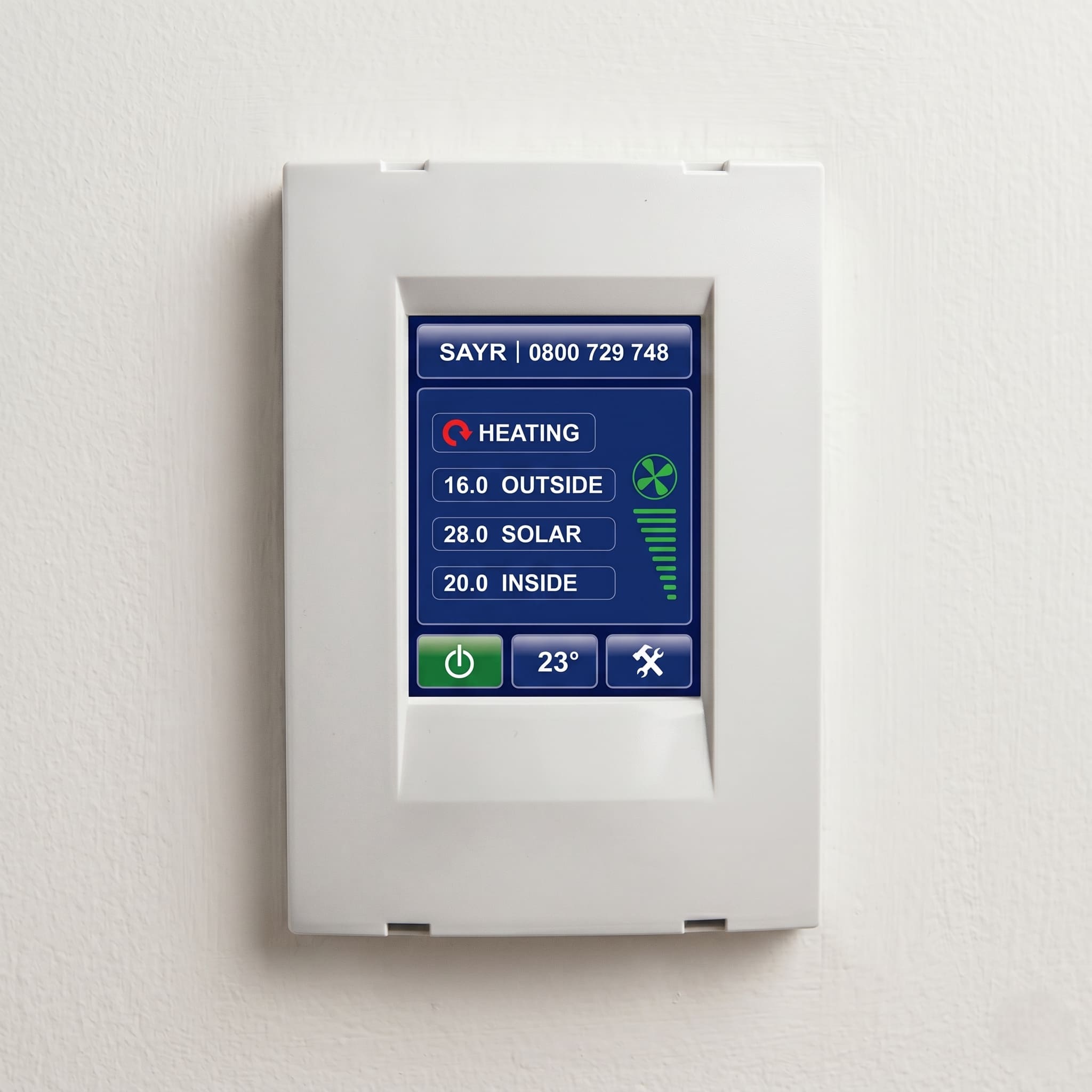
During normal operation your controller shows four readings: OUTSIDE (current outdoor temperature), SOLAR (roof cavity temperature), INSIDE (current indoor temperature), and your target temperature. Reading these four together tells you what the system is doing at any given moment.
When SOLAR is higher than INSIDE and INSIDE is below target, the system is actively heating. The HEATING arrow appears on screen. When SOLAR is lower than INSIDE the system is waiting for conditions to be useful. No arrow means the system is not in a position to help yet.
The display also shows a fan speed visualisation through graduated bars. A full bar means full speed. The power button shows green when running and red when standby.
The target temperature is adjustable. Touch the temperature button lightly and up and down arrows appear on either side of the number. Adjust to your preferred target and touch the button again to save. Raising the target does not make the system deliver more heat than the roof cavity allows. It sets the goal. What is achievable depends on conditions.
Fan speed is automated. The system adjusts continuously based on the relationship between roof cavity temperature, indoor temperature, and the target. There is no manual fan speed control for day-to-day use.
What you do have is MAXvent. This is a manual purge function that forces maximum airflow when you want it. To activate it, touch and hold the middle temperature button for three seconds. The word MAXvent appears above the buttons and the fan speed bar shows full capacity. It runs for one hour and reverts to standard automated mode on its own. You do not need to turn it off manually.
Sudden odours: Cooking smells, paint fumes, anything airborne you want cleared quickly. One activation, one hour.
Heavy window condensation that is not clearing: If multiple windows are badly affected first thing in the morning, one MAXvent cycle will move more air through the home faster than the system does in normal automated mode.
Summer evening roof heat flush: Once the sun has gone down and outdoor temperatures have started to drop, open some windows or doors and activate MAXvent for an hour. This pushes the accumulated hot air from the roof cavity through the home and out through the open windows and doors. As that hot air clears, cooler outside air takes its place in the roof cavity. Close the windows when the cycle completes and let the system manage overnight.
After a long period off: If you have restarted the system after an extended shutdown, one MAXvent cycle with windows open accelerates the clearing of accumulated stale air from the home and roof cavity.
Open some windows or doors before activating MAXvent so the air has somewhere to go. One hour is enough for most situations. Running it beyond that is not recommended as outdoor conditions can change during a long purge and work against how the system normally manages itself.
The Min Fan Speed setting sits in the service menu and should be left exactly where the installer set it. It is calibrated to the size of the home and adjusting it affects performance.
On cold winter mornings the system will sometimes show as off. This is the auto-off protection activating when the roof cavity drops to a temperature that would not benefit the home. The system does not publish the exact lower threshold, but early morning in winter is the most common time to see it. The system restarts automatically once the roof space warms up. If the controller shows off at 7am on a cold morning, check again at 10am. In most cases it will have restarted without any input from you.
The same protection applies in summer. When the roof cavity exceeds 35°C the system pauses automatically to avoid pushing overheated air into the home. It restarts later in the afternoon or evening when the cavity cools.
Neither state is a fault. Both are the system managing itself the way it was designed to.
There is also a smoke detector in the roof cavity. That detector is a safety shutoff for the ventilation fans, not a house fire alarm. If it detects smoke in the roof space, the fans stop so the system does not distribute smoke through the home. It is not connected to your household alarm system and does not replace domestic smoke detectors.
Your controller is either a Version 1 or Version 2 unit. The reset process differs between them.
On Version 1 controllers: Tap the word SAYR in the top left of the screen. Tap the settings button, which shows a hammer and spanner icon, three times. Use the middle button to scroll until you reach the Filter screen. Use the down arrow to reduce the displayed number to 0. Hold the middle button for three seconds until you hear a beep and the alert clears.
On Version 2 controllers: The filter reset function sits directly within the settings screen, without the multi-tap sequence.
If neither of these sequences matches what you see on your controller, you may have an earlier model. On some older units the reset is accessed by touching the word SAYR in the top left of the screen, then tapping the settings button three times to reveal the filter screen. If you are unsure which sequence applies to your controller, a technician can confirm the right steps for your specific unit during a service visit.
If the alert returns shortly after a reset, the filter was likely replaced but the counter was not reduced fully to zero. Work through the sequence again from the beginning.
A professional service covers the fan housing, ducting runs, and ceiling diffusers. These are the components the filter change does not reach.
The filter sits in the roof cavity between the fan unit and the ducting runs that supply the ceiling diffusers. It catches what the roof space air carries. In a typical Auckland home that includes roof dust, insulation fibres, and whatever else has accumulated in the cavity over the years the system has been running. What bypasses the filter, or what collects in the fan housing itself, is not visible from inside the house and is not addressed by a filter change alone.
A professional service opens the fan housing to check the internal components and clean any accumulation from the blades and casing. It checks the ducting runs for sections that have disconnected or partially collapsed, which reduces airflow to the rooms those runs serve. It clears the ceiling diffusers, which collect dust on the face and inside the body over time. Airflow is verified at each vent after the work is done.
Most Sayr systems have only ever had filters changed. A housing that has never been opened, ducting that has never been checked, diffusers that have never been cleared — that is not a fully maintained system. The filter change is one component of a full service. A professional visit covers the rest.
Sayr provides a 6-year unconditional warranty covering defective materials and faulty workmanship. That warranty covers manufacturing defects, not routine maintenance. Servicing and filter changes by a qualified provider do not fall within the scope of what the warranty covers or restricts. Keep your original installation documentation in case you need to make a claim on a component fault.
MiHT is a maintenance-only provider. We don't sell or install systems, which means the recommendation you get is based solely on what the system needs. For the full scope of what a professional ventilation service involves, this article explains the complete process. If your Sayr system is due, you can book a service directly.
Yes. A service visit confirms the condition of the system and what it needs. That information is worth having before any other decision is made.
Many of the Sayr units still running in Auckland homes are 15 years old or more. A system that age can be in good working order or in a state where the fan housing has never been opened, the ducting has loosened in multiple places, and the filter has been running well past its useful life. A service visit is the only way to know which situation you are in. The cost of a visit is a fraction of replacement, and what it produces is a condition report that tells you exactly what was found.
Your Sayr keeps running whether the filter is fresh or overdue by eighteen months. The fan runs whether the housing behind it is clean or not. The system gives no visible signal from below that its output has degraded. A house that feels stale, or that is developing window condensation it was not producing before, may simply have a system that has been deferred too long. That is the Healthy Home Blindspot. The system installed to protect the indoor environment becomes the source of the problem while appearing to run normally.
A filter replaced annually, a housing kept clean, and ducting that has been checked costs less over the life of the system than the alternative. That is the Set and Forget Cost playing out across every year the system runs unserviced.
In winter, performance depends almost entirely on how much solar energy the roof cavity accumulates. On sunny days the system can deliver meaningfully warm air into the home. On cold overcast days the cavity stays cool and the system may sit in its auto-off protection state for extended periods. That is normal. The system is not running because running would push cool air into a cool house, which is not useful. It restarts automatically once the cavity warms up.
There is nothing to adjust to improve winter performance on a poor weather day. The system manages itself. What you can do is make sure the filter is clean so the system is not working against a restriction it does not need to. A loaded filter on a day when the system is already working at its limit makes the gap between target and delivery wider.
In summer the system pauses automatically when the roof cavity exceeds 35°C and restarts later in the afternoon or evening when the cavity cools. To flush accumulated heat from the roof cavity or clear stale air more quickly, activate MAXvent, open some windows or doors, and let the system run at full speed for up to one hour.
After restarting the Sayr following a long period off, expect increased condensation on windows for the first few days. The system draws accumulated moisture out of the building fabric as it re-pressurises the home. It will clear as the system normalises the indoor air. If it continues beyond a week, check the filter first and confirm the system is running continuously.
If the controller is blank, unresponsive, or showing a fault beyond the filter alert, that is outside the scope of settings and maintenance and needs a professional look.
Your controller has counted 750 days of runtime and is prompting a filter replacement. You can silence the beep for one week by holding the F for three seconds. To clear the alert permanently, replace the filter and reset the counter through the controller settings. On Version 1 units: tap SAYR top left, tap the settings icon three times, scroll to the Filter screen, reduce the number to zero, and hold the middle button for three seconds until you hear a beep. On Version 2 units the reset sits directly within the settings screen. The alert returns if the counter is not reduced fully to zero.
Yes. The Sayr filter dimensions are 305 x 295 x 95mm, which match the older HRV Gen1 steel-box filter. Any third-party F7 or F8 filter sold as compatible with an HRV Gen1 system will fit. These are available from NZ ventilation filter suppliers and are a practical option if a Sayr-branded filter is difficult to source.
The filter cannot be washed. Washing destroys the filtration media and once washed it no longer performs as designed regardless of how clean it looks. When the filter is due it needs to be physically replaced.
The system draws accumulated moisture out of the building fabric after a period off as it begins to re-pressurise the home. Increased condensation on windows in the first few days after restart is normal. If it continues beyond a week, check that the filter is clean and that the system is running continuously rather than cycling on and off.
The roof cavity smoke detector is a safety shutoff for the ventilation fans only. If it detects smoke in the roof space it stops the fans so the system does not distribute smoke through the home. It is not connected to your household alarm system and does not replace domestic smoke detectors.
Yes. The system is designed to run continuously. The auto-off protection handles periods when the roof cavity is too hot, pausing automatically above 35°C and restarting when the cavity cools. To flush heat from the roof cavity or stale air from the home more quickly, activate MAXvent with some windows or doors open and let it run. It switches off automatically after approximately one hour.
Any NZ ventilation filter supplier carrying HRV Gen1 dimensions stocks what you need. The filter is 305 x 295 x 95mm and third-party F7 and F8 filters in that size are widely available. For system faults beyond filter and maintenance scope, refer to your original installation documentation for manufacturer contact details.
Sayr provides a 6-year unconditional warranty covering defective materials and faulty workmanship. That warranty covers manufacturing defects, not routine maintenance. Servicing and filter changes by a qualified provider do not fall within the scope of what the warranty covers or restricts. Keep your original installation documentation in case you need to make a claim on a component fault.